

Disclosure: the link to Fotor Video Agent in the "What I actually paid" section below is an affiliate link and earns a commission if you subscribe through it. It is the only such link in this article - the other twelve tools I link here earn me nothing. Fotor had no sight of this piece and no say in it, and you will see below that their pricing is the example I use of how badly a monthly figure can mislead.
The monthly price on an AI video tool is close to useless. You are not buying a month, you are buying some number of finished videos, and almost nobody prices it that way on the page you land on.
I keep pricing records for every tool in this directory, read off the vendor's own page and dated. There are 53 video tools in there, 49 with a checked record. Here is what that set actually looks like, and how to get from a monthly price to the number you care about.
"Free" means three different things
Of the 49 video tools where I could establish what the free offering is:
- 20 have a real free tier. It continues indefinitely, usually watermarked or limited.
- 12 have a free trial only. It ends. Calling this free is the most common piece of pricing theatre in the category.
- 17 have nothing free at all.
So when you see "free" on a video tool, it is closer to one chance in three that it means "free for fourteen days". Two tools in the set are even labelled freemium by their own submitters while having no free tier at all, which is why I check rather than take the word.
The price you see is often the annual one
Here is Pictory's pricing page as it loads:

The annual toggle is already on. You see $25, $35 and $119. The real month-to-month prices are the struck-through ones: $29, $59 and $199. That is not a trick unique to Pictory; it is close to standard. It means the number in your head when you compare two tools is frequently a prepaid annual rate rather than what leaving after one month would cost.
Every price in our directory is the month-to-month figure for exactly this reason. Annual prepay is a separate decision from which tool to use.
Cost per video, from one of the few who publish it
TapVid does something unusual and genuinely helpful: it states credits and an estimated video count on the same card.
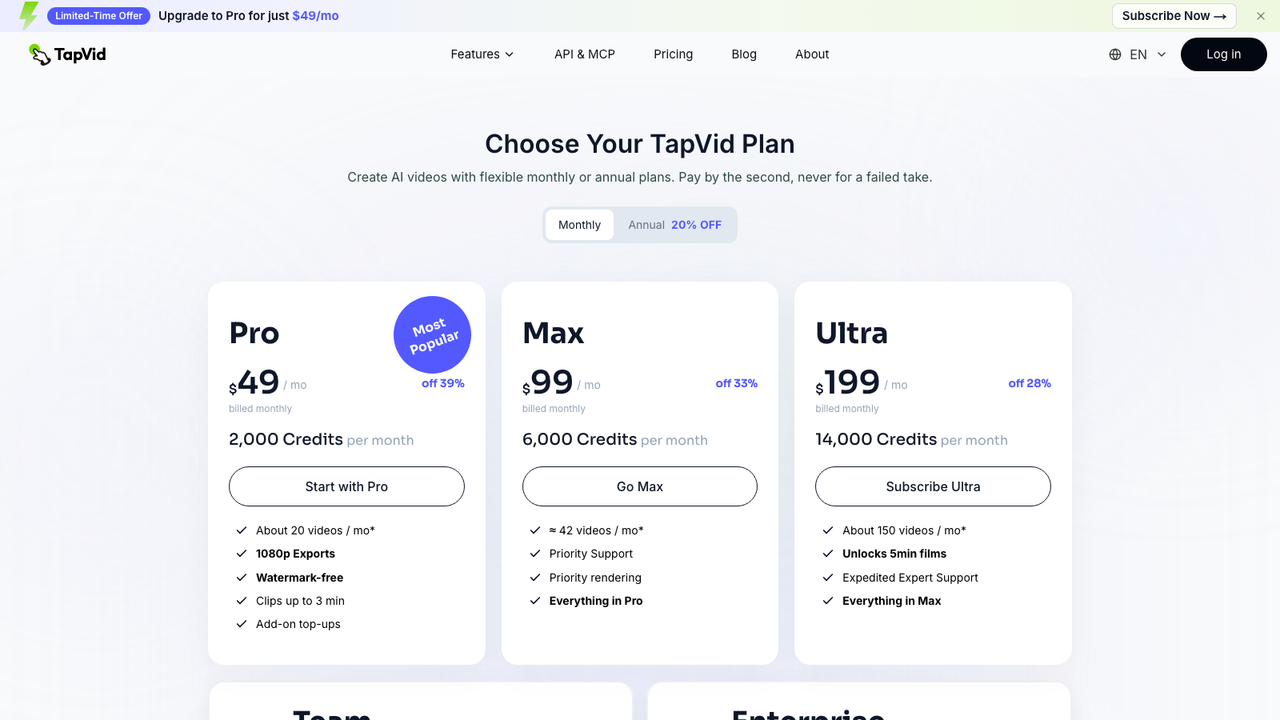
That lets you do the division the page is usually hiding:
| plan | monthly | videos | per video |
|---|---|---|---|
| Pro | $49 | about 20 | $2.45 |
| Max | $99 | about 42 | $2.36 |
| Ultra | $199 | about 150 | $1.33 |
Note what the per-video column does that the monthly column cannot: the $199 plan is the cheapest one per video. Four times the monthly cost, roughly half the cost per video. If you are comparing entry tiers across vendors, you are comparing the worst rate each of them offers.
The asterisks matter too. "About 20 videos" assumes a length and a model. A longer clip or a better model eats more credits, so treat these as a ceiling.
What I actually paid
I tested Fotor Video Agent properly and wrote it up. Three finished videos, including one with an AI presenter, cost 949 credits. That is 316 credits each.
On their monthly plan that works out at $12.65 a video. On the annual plan, $3.54. Same tool, same videos, a 3.5x spread depending only on how you pay.
Which is the real finding here: on a single tool, how you pay can move the cost per video more than switching vendor would.
So what do you actually try
I am not going to tell you which makes the best video, because I have not tested 53 tools. What I can tell you is which ones let you find out for yourself without paying, and that turns out to depend entirely on which job you are doing.
Making video from a text prompt. Runway and Pika both run $0 to $95 and both have a real free tier, so you can try either before deciding. OpenAI Sora has nothing free. Start with Runway or Pika, and see the three side by side in Runway vs Pika vs Sora.
Talking-head and avatar video. Synthesia is $0 to $89, HeyGen is $0 to $149, and both let you test free. Synthesys starts at $29 with no free tier at all. Synthesia has the lower ceiling of the two you can try, which matters because this is the category where the top tier is where you end up. Full breakdown in HeyGen vs Synthesia vs Synthesys.
Cutting long video into shorts. Opus Clip at $0 to $29 is the cheapest ceiling of anything here and has a genuine free tier. Descript is $0 to $65 and also free to try. Pictory is the one from the screenshot above: $29 to $199, and trial only. See Descript vs Opus Clip vs Pictory.
Notice the pattern across all three. In every group, the tool with no free tier is the one you cannot evaluate without a card, and in two of the three it is also not the cheapest. There is no group where paying up front gets you a better deal on entry.
If you want the smallest possible commitment in the category regardless of job, Screenweaver runs $0 to $9.99, the cheapest ceiling of any video tool I have a record for.
Now the part I did not expect. I sorted the whole category by entry price to find the bargains. Here are the eight cheapest:
seedance-2-0 $7.99 · artaivo $9 · animate-photo $9.90 · ray-3-2-ai $9.90 · seedancetwo $9.90 · recapo-ai $9.99 · youart $9.99 · kaiber $10
Not one of them has a free tier. Five are trial-only, three have nothing free at all. The cheapest-looking options in the category are precisely the ones where you cannot try before you commit a card.
That is not a conspiracy. It is just what a low entry price has to do: if you are charging $8 a month you cannot also give the product away. But it does mean "cheapest" and "try it first" point at completely different shortlists, and the cheap end of a pricing table is the last place to start if you have not decided yet.
Every comparison above is in the full comparison index, which puts the real month-to-month prices side by side with the date each was checked.
Work it out before you subscribe
Three questions, in order:
- Is the free thing a tier or a trial? If it ends, it is a sales process, not a price.
- What is the month-to-month price? Toggle annual off before you compare anything.
- How many finished videos does that buy? Divide. If the vendor will not tell you how many credits a video costs, generate one on the trial and read the balance before and after. That is the only number that survives contact with actual work.
The two tools I have real per-video numbers for land between $1.33 and $12.65. That is a 9x spread across two products, and the monthly sticker price on either one would not have told you where you were going to land.
Pricing in this directory is read off each vendor's own page and carries the date it was checked, so you can see how stale it is. The video tools are all there.