You capture a room with your phone, train a Gaussian splat, open it, and the scene floats in a cloud of grey fuzz. Bits of sky hang in mid-air, the floor bleeds into nothing, and the file is a gigabyte. SuperSplat Editor is the free browser tool I would reach for to fix that, and version 3.0 changed enough this autumn to be worth a fresh look.
A note on what I checked: I read PlayCanvas's release posts, the docs and the GitHub releases, and opened the editor and the superspl.at gallery in a browser on 19 October 2026. I have not cleaned a capture of my own with it, so there is no verdict here on how long a real cleanup takes.
What SuperSplat Editor does, and what it doesn't
A Gaussian splat is a 3D scene stored as millions of small, coloured, semi-transparent blobs instead of triangles. You make one with a capture app or a training tool. SuperSplat edits the result. It does not capture or train anything.
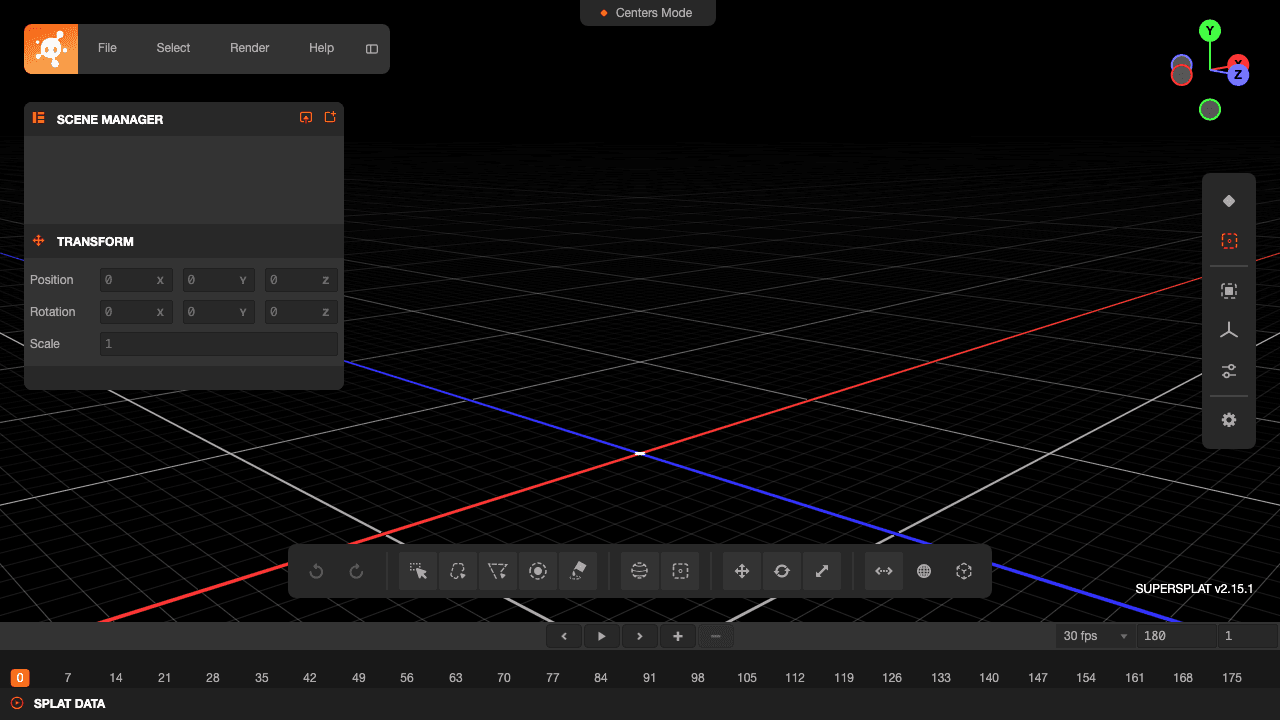
PlayCanvas, the team behind the web game engine of the same name, builds it. The editor runs in your browser at superspl.at/editor, it is MIT licensed, and the GitHub repo sits at about 10,400 stars as I write this. Your file stays on your machine until you choose to publish.
The jobs it covers are the ones you need after training:
- Select and delete floaters, the stray blobs that hang in the air around a capture.
- Crop, move, rotate and scale the scene, or load several splats into one scene.
- Adjust colour, on the whole scene or, since 3.0, only on a selection.
- Animate a camera on a timeline and render it to video, including 360° equirectangular video.
- Export to PLY, compressed PLY, SOG or SPZ, or publish to a hosted viewer page.
It opens .ply, .splat, .sog, .spz, .ksplat and its own .ssproj project files, so a splat from most trainers should load.
Version 3.0 is a memory story
PlayCanvas shipped 3.0 on 9 September 2026 and rebuilt the renderer and the data model on WebGPU. Projection, sorting and drawing moved to the GPU. If you tried 2.x on a big capture and watched the tab freeze, these are the numbers that matter. PlayCanvas measured peak JavaScript heap on a 4.4 million splat scene (a 990 MB PLY):
| Task | 2.x | 3.0 |
|---|---|---|
| Scene loaded, idle | 1,557 MB | 105 MB |
| Save PLY | 1,722 MB | 623 MB |
| Save compressed PLY | 2,982 MB | 1,759 MB |
| Publish | 1,934 MB | 741 MB |
| Render 1080p video | 1,673 MB | 142 MB |
PlayCanvas ran those measurements, I did not. They also report that one click with the orient tool on a 2.4 million splat scene went from about 8.5 seconds of frozen UI to under 25 ms.
The new tools in 3.0 are about selection, which is most of the cleanup work. A Sphere Brush (Shift+B) paints a 3D selection that follows surfaces. Selection Depth (N) limits a selection to what you can see, so you stop grabbing the wall behind the chair. The default render mode, Stochastic Alpha, skips depth sorting while you move the camera, so heavy scenes stay responsive.
The releases since then are small. 3.3 added an overdraw heat map, 3.4 loads a PLY in a single pass with a progress bar, and 3.5.2 on 5 October checks publish limits before it uploads. Scenes over 40 million splats now need LODs to publish.
The catch is WebGPU
3.0 dropped WebGL2. You need current Chrome or Edge, Safari 26 or later, or Firefox with WebGPU switched on. Without it the editor shows a startup message instead of loading. PlayCanvas kept 2.x on a v2 branch, last released as 2.32.5, if your machine can't run the new one.
Two more things to know before you start:
- Projects saved in 3.0 need 3.0 or later to open. 2.x projects open fine in 3.0, so the upgrade only goes one way.
- If you used 2.x before, hard-refresh once. The old service worker can keep serving the cached version.
Publishing is free, but you need two logins
You don't need an account to open, edit or export a file. Publishing to superspl.at needs a free PlayCanvas account, and you have to log in at playcanvas.com and again at superspl.at. One user on the PlayCanvas forum kept getting a "must create an account" message until they did the second login.
File, then Publish, gives you a title, a description, background colour, field of view, and the camera animation from your timeline. Scenes with a million or more splats over a large area get LODs turned on, so viewers stream the scene in stages. New scenes start unlisted. You list them from the Manage page if you want them in the Explore gallery.
The docs don't state a splat count or file size cap for the editor's publish flow. The direct upload page mentions a 10 GB limit, and the 40 million splat LOD rule is in the release notes. If you are publishing something huge, test with a copy first.
Where it fits next to other 3D tools
SuperSplat is the cleanup and publish step. You still need something upstream that turns photos or video into a splat. The superspl.at home page runs a "Made with Postshot" collection, which tells you one trainer people pair it with.
The tools I'd compare it with on this site do different jobs. Our Luma AI listing files it under text-to-video, at $30 to $300 a month, and Image3D turns a photo or prompt into a mesh you can export, from $39.99 a month after a free tier. Neither one is built to clean up a splat file you already have. If you are deciding between them, the Luma AI vs SuperSplat Editor comparison lays out the differences side by side.
Should you use it?
If you have a splat and it needs cleaning, cropping or sharing, yes. It costs nothing, it runs in a tab, and the 3.0 numbers suggest the old memory wall has shrunk a lot. The one-click starter project on downloadable scenes (Vite, TypeScript and the PlayCanvas engine, with your camera pose kept) is a nice touch if you want the splat inside your own web app.
Skip it if your browser lacks WebGPU and you can't change that, or if you want one tool that goes from photos to a finished scene. SuperSplat starts after the training step.
The SuperSplat Editor listing has the links and the licence. If you want to see what other people make with it before you capture anything, the trending page on superspl.at is a good half hour.