
I opened Recapo to update a pricing record in this directory and ended up spending an hour on it, because almost everything on the pricing page turned out to be either understated or overstated, and not always in the direction you would expect.
A note on what this is before you read further. I have not cut a video with Recapo, so there is no verdict here on output quality, and I am not going to invent one. What I can do is read the product surface carefully, add up the numbers, and place it against the fifty-odd video tools I already keep dated pricing records for. That is a useful exercise on a tool like this, because Recapo is not one product. It is about four, sold as one subscription, priced in a unit that is not videos.
It is four workflows, not an editor
The sidebar splits into three groups, and the split tells you how to think about the thing.
AI Editing Apps is the core, and there are four:
- Video Recap turns source footage into a structured recap. This is the movie-recap channel use case, and it is clearly the flagship: the examples on the front page are film recaps in English and Chinese with six-figure like counts.
- Shorts Maker pulls the strongest moments out of a long video and cuts them into vertical Shorts.
- Talking-Head does the same job for talks, podcasts and interviews.
- Product Promo assembles commerce video with matched A-roll and B-roll.
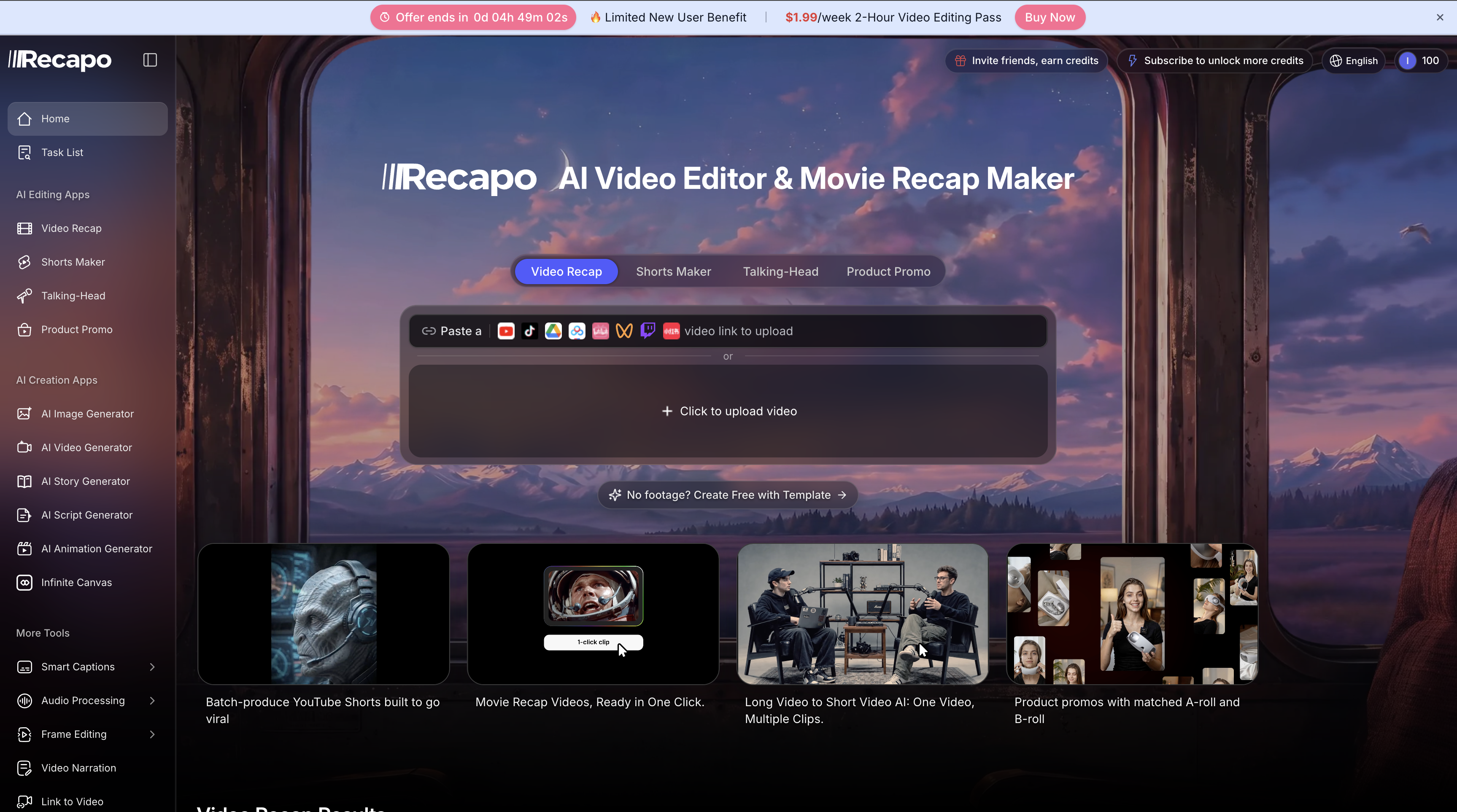
The four tabs across the middle are the four workflows, and the box under them takes a link from YouTube, TikTok, Drive, Twitch and several others, or a direct upload. That single input is the whole product thesis: one long source in, several finished assets out.
AI Creation Apps is a second, separate product bolted alongside: image generator, video generator, story generator, script generator, animation generator, and an infinite canvas. These make footage rather than cutting it.
More Tools is a long tail of utilities, and the footer lists dozens of them. Vocal remover, auto subtitle, subtitle translate, SRT to VTT, video compress, stem splitter, YouTube to MP3, aspect ratio crops at 1:1, 4:3 and 9:16, H.264 transcode, GIF to video. Individually these are the sort of thing you would find on a free single-purpose site. Collected in one place behind one login, they are a reason not to keep fifteen bookmarks.
Recapo's own FAQ describes the intended user as "movie recap creators, livestream clippers, course repurposers, talking-head editors, commerce-video teams, and faceless channels", and the common thread as wanting "a long source" to become "several connected assets" without moving between unrelated tools. That is an accurate description of what the interface is arranged to do. One of the testimonials on the page puts it better than the marketing copy does: "more a workflow hub than a mere editing tool."
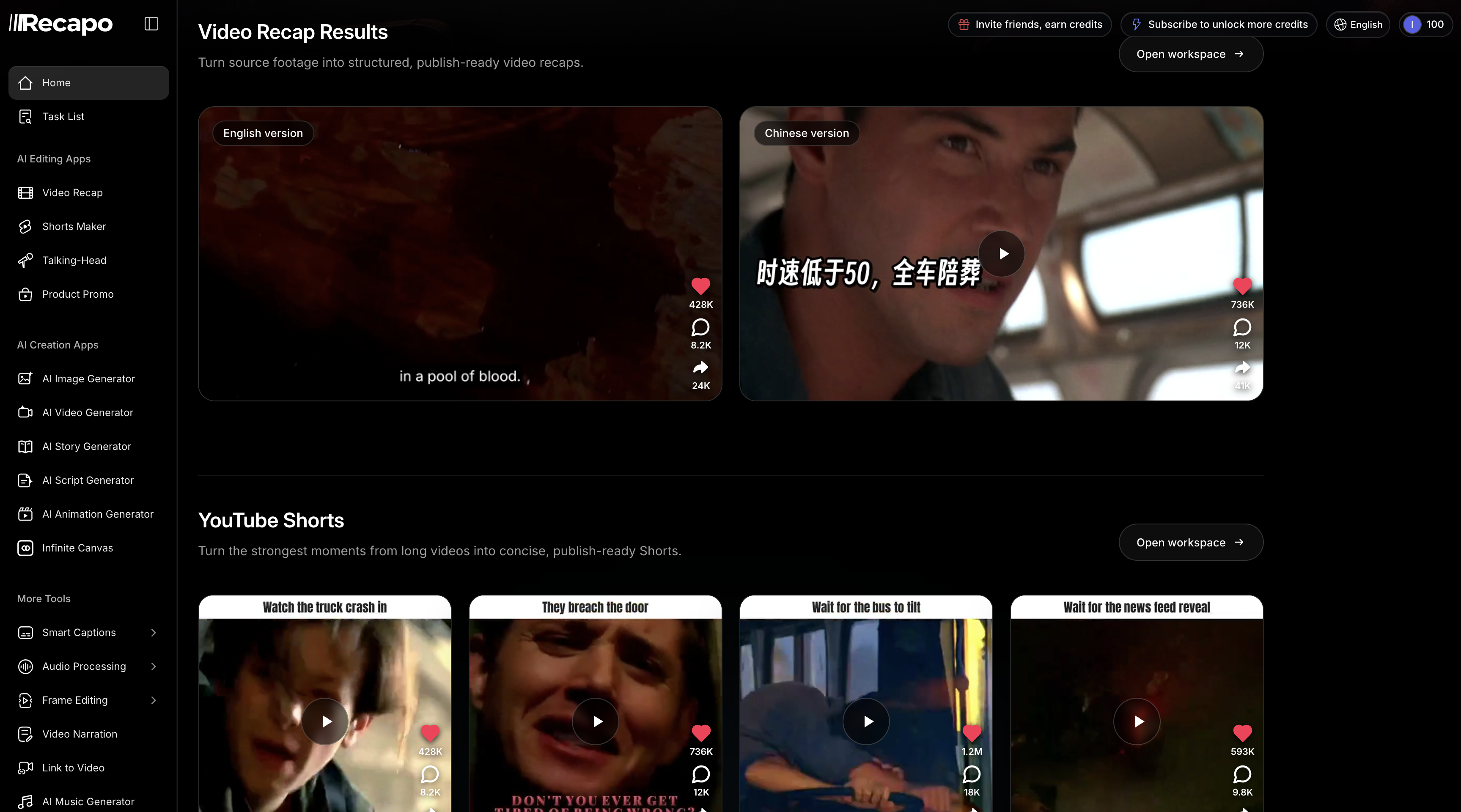
The examples Recapo leads with tell you what it is tuned for. Film recaps in two languages off one source, then vertical clips with the hook burned into the first frame. Note that the recap examples are cut from commercial film and television, which is the use case with the most legal exposure and the one Recapo puts front and centre.
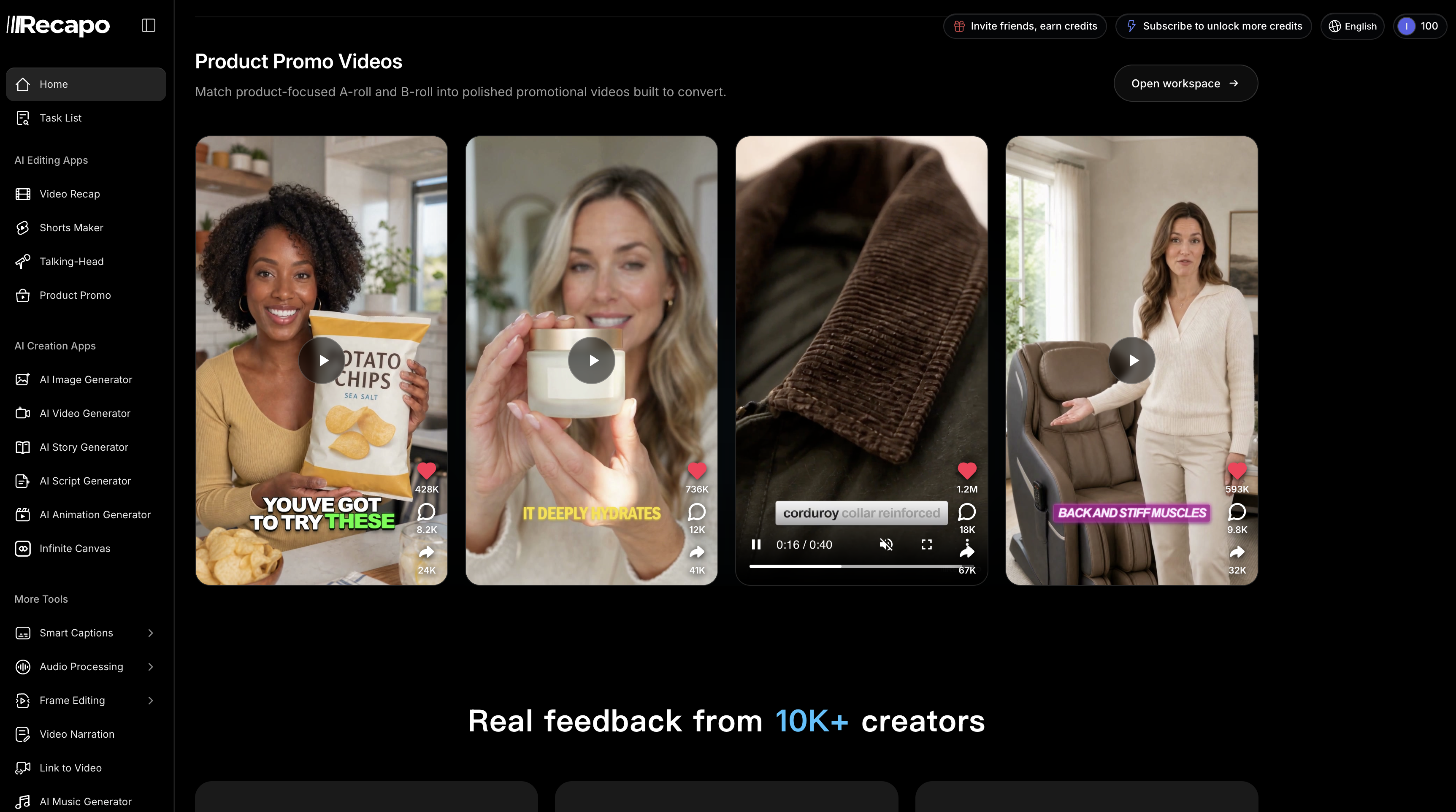
Product Promo is the least obvious of the four and the furthest from recapping: it matches A-roll to B-roll for commerce video, which is a different job from cutting a long source down.
If you want one tool that does one of those jobs extremely well, this is probably not it. If you want the four jobs in one place, that is the pitch.
Thirteen models, and the pricing page forgets most of them
Every pricing tier lists the same two lines under AI Creation: "All SD and Kling video models" and "All Nano Banana and Seedream image models".
The actual model picker inside the product has thirteen.
Video generation, eight: Seedance 2.5 (longer video with flexible references and audio), Seedance 2.0, Seedance 2.0 Fast, Kling 3.0 Omni, Kling 3.0, MiniMax H3 (native audio and multi-shot sequences), Vidu Q3 Turbo (described as the automatic default) and Vidu Q3 Pro.
Image generation, five: GPT Image 2.5, Nano Banana 2, Nano Banana Pro, Seedream 5.0 Pro and Seedream 5.0 Lite.
MiniMax, Vidu and GPT Image appear nowhere in those two pricing-page lines, and Vidu is the default the product actually runs. This is the rare case of a vendor underselling itself: the feature list on the page you buy from is missing three of the five model families you are paying for.
It also tells you something about where Recapo sits. Several of these are tools in their own right and I track them separately: Seedance 2.5, Nano Banana 2, GPT Image and Seedream 5 Pro all have their own listings and their own prices. Recapo is an aggregator with an editing workflow wrapped around it. You are paying for the orchestration and the credit pool, not for model access nobody else has.
The monthly page: three of four prices expire
Read on 18 September 2026 with the monthly toggle selected.
| Tier | Price shown | What it renews at |
|---|---|---|
| Starter | $9.99/mo | $9.99/mo |
| Basic | $1.99/wk, 2-Hour Pass | $16.99/mo after 7 days |
| Pro | $38.99/mo | $42.99/mo next month |
| Ultimate | $86.99/mo | $99.99/mo next month |
Only Starter charges in month two what it advertises in month one.
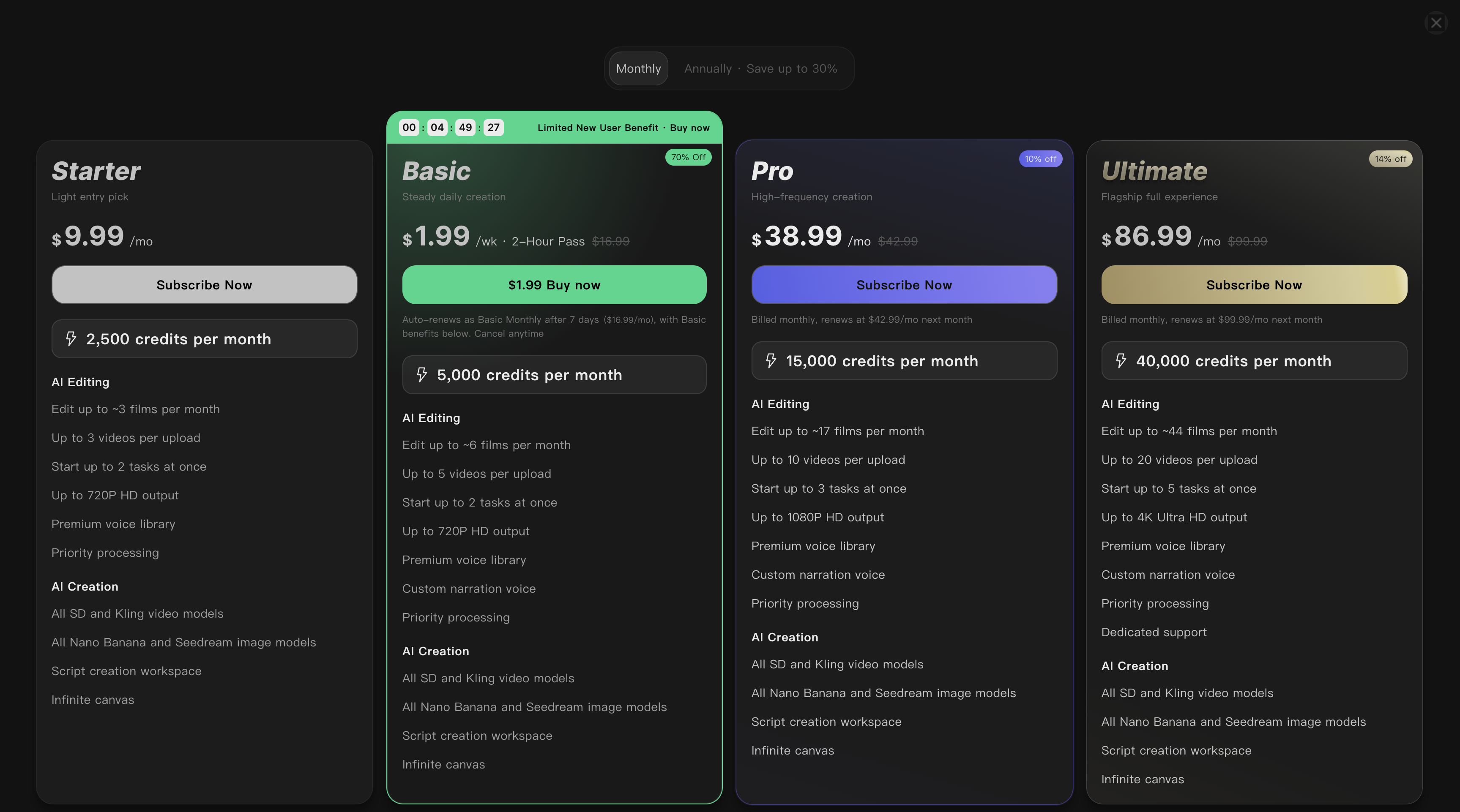
Every renewal price is on the card. Compare the size of the figure you are sold to the size of the figure you will pay: $38.99 set large against a struck-through $42.99, with "renews at $42.99/mo next month" in grey underneath.
The Basic card is the one the design pushes hardest: the only coloured border, the only countdown, the biggest discount badge, the brightest button. It reads "$1.99/wk, 2-Hour Pass", and underneath, in grey at a third the size: "Auto-renews as Basic Monthly after 7 days ($16.99/mo), with Basic benefits below. Cancel anytime."
So $1.99 buys two hours. Seven days later it is a $16.99 monthly subscription, 8.5 times the number on the button. Every word of that is disclosed on the card, which puts Recapo ahead of vendors who bury it in a terms page. The type hierarchy just runs in exactly the wrong direction.
The countdown took three captures to understand, and the answer is not the one I expected after two of them.
At 22:59 it read 3h00m06s. At 23:09 it read 2h50m35s. Nine minutes and thirty-one seconds had passed and the clock had fallen by exactly nine minutes and thirty-one seconds, so within a single session it is a genuine timer rather than a decorative one.
Then at 23:27 it read 4h49m27s. Twenty-eight minutes after the first capture, the deadline was an hour and forty-nine minutes further away than when I started. It had been re-seeded.
So the clock is real and the deadline is not. It counts down honestly while you watch it and quietly resets to a new number when you come back, which means the 70% is not a limited offer that expires at a particular moment, it is the price. That is worth knowing before it hurries you into a decision, and it is the single easiest thing to check on any pricing page: note the number, go away, come back.
The annual page: the discount is real on two tiers and imaginary on two
This is the part I did not expect, and it is the single most useful thing in this article.
Switch to annual and every card shows a lower per-month figure with a discount badge: 15% off Starter, 17% off Basic, 25% off Pro, 30% off Ultimate. Underneath each, again in grey, is the sentence that matters: "Billed annually, $X first year, then $Y/year."
| Tier | Annual shown | Year 1 total | Year 2+ total | Year 2+ per month | Monthly price | Real ongoing saving |
|---|---|---|---|---|---|---|
| Starter | $8.50/mo | $101.88 | $119.88 | $9.99 | $9.99 | 0% |
| Basic | $14.00/mo | $167.88 | $203.88 | $16.99 | $16.99 | 0% |
| Pro | $32.00/mo | $384.00 | $408.00 | $34.00 | $42.99 | 21% |
| Ultimate | $70.00/mo | $840.00 | $900.00 | $75.00 | $99.99 | 25% |
On Starter, $119.88 a year divided by twelve is $9.99, which is the monthly price to the cent. On Basic, $203.88 over twelve is $16.99, likewise. Committing to a year on either of the two cheapest plans saves you nothing at all from year two, and costs you the flexibility to leave. The advertised 15% and 17% are first-year promotional rates and nothing more.
On Pro and Ultimate the annual discount is real and substantial, 21% and 25% ongoing. The "Save up to 30%" in the toggle is true of Ultimate in its first year only.
I have looked at a lot of pricing pages for this directory and I had not seen this particular shape before: a genuine annual discount on the expensive tiers and a purely cosmetic one on the cheap tiers, presented identically. If you are on Starter or Basic, pay monthly.
Credits are the unit, so work out the rate
Every tier is a credit allowance, and Recapo publishes its own estimate of how many films that allowance edits, which makes the comparison possible without touching the product. Using renewal prices, because that is what you pay from month two:
| Tier | Price | Credits/mo | Films (vendor est.) | Cost per film | Credits per $ |
|---|---|---|---|---|---|
| Starter | $9.99 | 2,500 | ~3 | $3.33 | 250 |
| Basic | $16.99 | 5,000 | ~6 | $2.83 | 294 |
| Pro | $42.99 | 15,000 | ~17 | $2.53 | 349 |
| Ultimate | $99.99 | 40,000 | ~44 | $2.27 | 400 |
A film costs between 833 and 909 credits on every tier, so the work is priced almost identically throughout. What changes is the rate you buy credits at: 250 per dollar at the bottom, 400 at the top, a 60% better rate on Ultimate for the same operation.
Which means these are not really feature tiers. They are a volume discount with some gating layered on top, and the gating is thinner than four cards suggest. Everything in AI Creation is identical across all four. Three things genuinely differ: the resolution ceiling (720p on Starter and Basic, 1080p on Pro, 4K on Ultimate), concurrency (two tasks, two, three, five), and custom narration voice, which starts at Basic.
If you publish anywhere that 720p looks soft, the bottom two tiers are not a cheaper version of the product. They are a different one.
What "free to try" actually gets you
The pricing page shows no free tier. The product gives you 100 credits on signup, and the FAQ says you "can sign up and try the core tools for free, then upgrade for higher quotas and output quality".
At roughly 833 credits per film, 100 credits is about 12% of one video. That is enough to click around and generate something small. It is not enough to produce one finished piece of work and judge the output, which is the thing you actually want to do before paying.
This matters most in comparison. Opus Clip and Vizard both have genuine free tiers with a real monthly allowance, and both do the long-video-to-Shorts job that is one of Recapo's four. If your only requirement is clipping long video into Shorts, you can establish whether those two work for you at zero cost and zero risk. With Recapo you are buying a month to find out.
Where it sits against the tools I already track
I keep dated pricing records for 53 video tools, read off each vendor's own page. Against the closest four:
| Tool | Range | Free tier | The job it is built for |
|---|---|---|---|
| Recapo | $9.99 to $99.99 | No, 100 credits | Four workflows plus generation, one credit pool |
| Opus Clip | $0 to $29 | Yes | Long video into Shorts, done well |
| Vizard | $0 to $39 | Yes | Long video into Shorts, for marketing teams |
| Pictory | $29 to $199 | No | Script and article into video |
| Descript | $0 to $65 | Yes | Edit video by editing the transcript |
Recapo is the only one of the five with no free tier and the widest spread. The comparison pages put these side by side on the fields that matter, and you can read Recapo against Opus Clip or Recapo against Vizard directly, or build any other pair from the compare tool.
If you are not sure which of the four jobs you actually need, the find a tool by task page takes a description of the job and a budget and works back from there, which is usually a better starting point than a feature grid.
For the wider picture on how video pricing works, I went through all 53 in what AI video tools actually cost per finished video. Only 20 of them have a free tier that is genuinely free rather than a trial.
Four limitations worth knowing before you pay
Rendering runs in the cloud and you have to stay put. Recapo's own FAQ: "Keep the page open during an active render because leaving can cancel it." That is a real operational constraint if you were planning to queue a batch and go and do something else.
The rights problem is yours. The FAQ says to "paste an authorized video link" and lists "rights" among the things users must still exercise editorial judgment over. Movie recap is the flagship use case here and it is also the one that sits closest to a copyright complaint. Recapo is explicit that this is on you, which is fair of them and worth reading twice before you build a channel on it.
It is not a timeline editor. Their words again: for "frame-level compositing or complex motion graphics, finish the output in a traditional editor when necessary." The product is built around goals and settings rather than an empty timeline, which is the point, but it caps what you can do inside it.
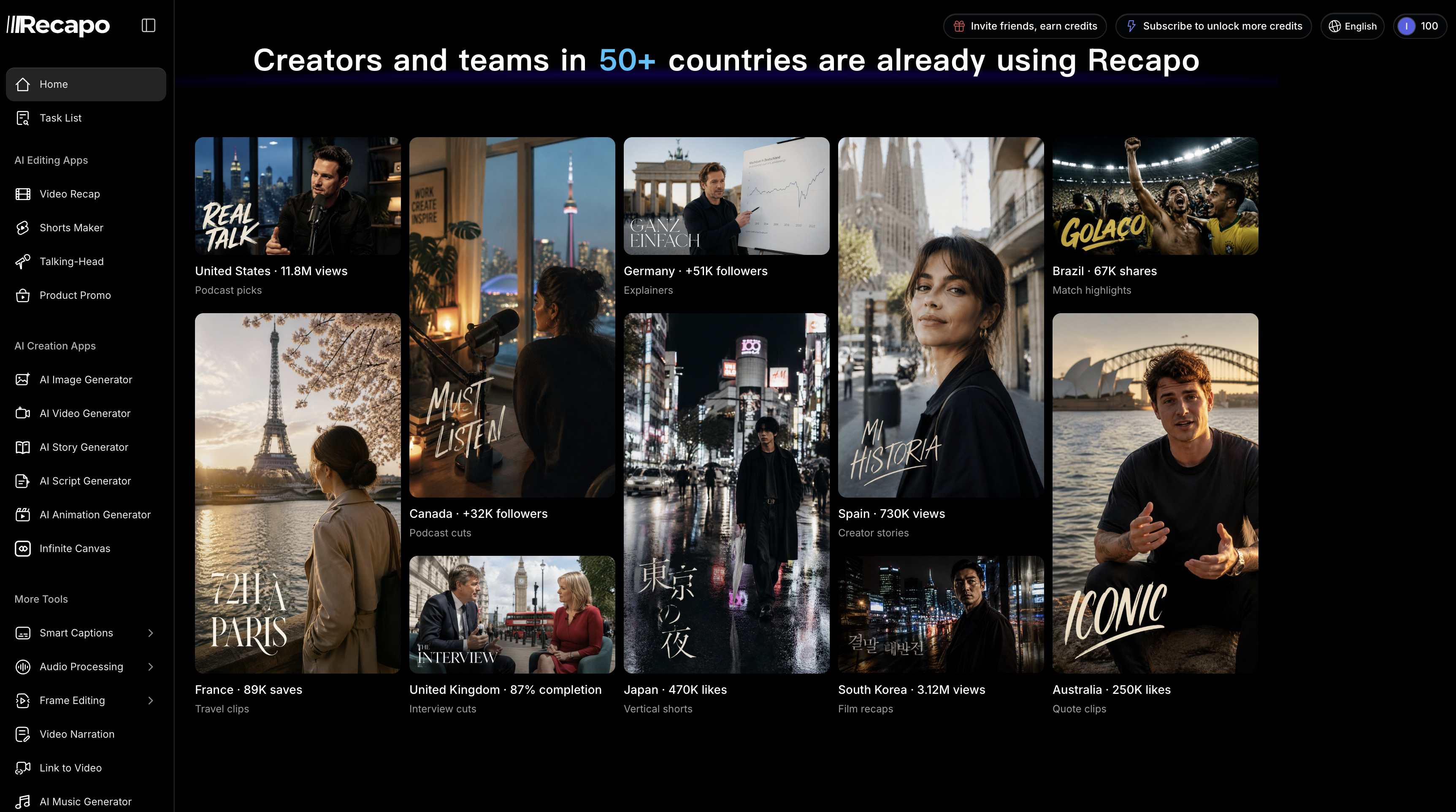
The social proof is unverifiable. "10K+ creators", "50+ countries", and testimonials quoting "$4,600/mo" and "1.8M views". These are vendor self-reported with no methodology attached, and I have no way to check any of them. Treat them as marketing, which is what they are.
Who it is actually for
If you run a faceless channel or a recap channel and you are currently paying for a clipper, a voice tool, a subtitle tool and an image generator separately, the case for Recapo is the credit pool: one subscription across four workflows plus generation, and the per-film cost drops as you scale. At Pro, $42.99 for roughly 17 films at 1080p is defensible against buying those pieces individually.
If you make around three videos a month, Starter at $9.99 is honest enough and $3.33 a film is the price of not committing. Pay monthly, since the annual plan at that tier saves nothing.
If you only need long video cut into Shorts, start with Opus Clip or Vizard instead. Both are free to establish whether they work, and Recapo's advantage is breadth you would not be using.
And if you are tempted by the $1.99 pass on the countdown, the timer is real but so is the $16.99 a month that follows it seven days later. That is a reasonable price for what you get. It is just not the number on the button.
Prices and features above were read from recapo.ai on 18 September 2026, monthly and annual toggles both checked. Vendors change them without notice and this one runs promotions, so verify on the page before you buy.