I'll be honest - when Google dropped Nano Banana Pro (their fancy name for Gemini 3 Pro Image), I thought "great, another AI tool I'll need to pay for." But after digging around for a week, I found several legitimate ways to use it completely free.
No sketchy workarounds. No credit card required. Just straight-up free access to one of the best image generation models out there.
What Makes Nano Banana Pro Worth Your Time
Before we dive into the free access methods, let's talk about why you'd even want this tool.
Think-Before-Draw Intelligence Unlike most image generators that slap pixels together based on your prompt, Nano Banana Pro actually thinks about what you're asking for. It uses the Gemini 3 Pro reasoning engine to understand Context, which means fewer weird AI mistakes and more images that actually make sense.
Text That Doesn't Look Like Alphabet Soup You know how most AI image generators completely butcher text? Nano Banana Pro actually handles text in images correctly. Multiple languages, proper formatting, and readable fonts. It's a game-changer if you need mockups, posters, or infographics.
4K Output Quality We're talking professional-grade 4K resolution here. Not some blurry 512x512 nonsense that looks fine in your Discord but terrible anywhere else.
Real-World Knowledge Integration Because it's built on Gemini 3, it can pull in real-world data and current information. This matters more than you'd think when generating images that need to be accurate or topical.
See It In Action: Before & After
Let me show you what Nano Banana Pro can actually do. Here's a real example:
Original Image:

After Nano Banana Pro Edit (Storm Scene):

This is what I mean by "think-before-draw intelligence." The model understood the Context, maintained the subject's characteristics, and seamlessly integrated dramatic storm elements while maintaining coherence. Try doing that with basic image editors in under 30 seconds.
Method 1: Official Google Gemini App (The Easy Route)
This is the most straightforward method, and honestly, where most people should start.
Desktop Access (My Preferred Method)
Step 1: Go to Gemini Head to gemini.google.com and sign in with any Google account. Free Gmail account? Perfect. Works fine.
Step 2: Switch to Thinking Mode This is the crucial part everyone misses. Look at the top of the chat interface - there's a model selector dropdown. You need to switch it to "Thinking" or "Gemini 3 Pro". This is what actually uses the Nano Banana Pro engine under the hood.
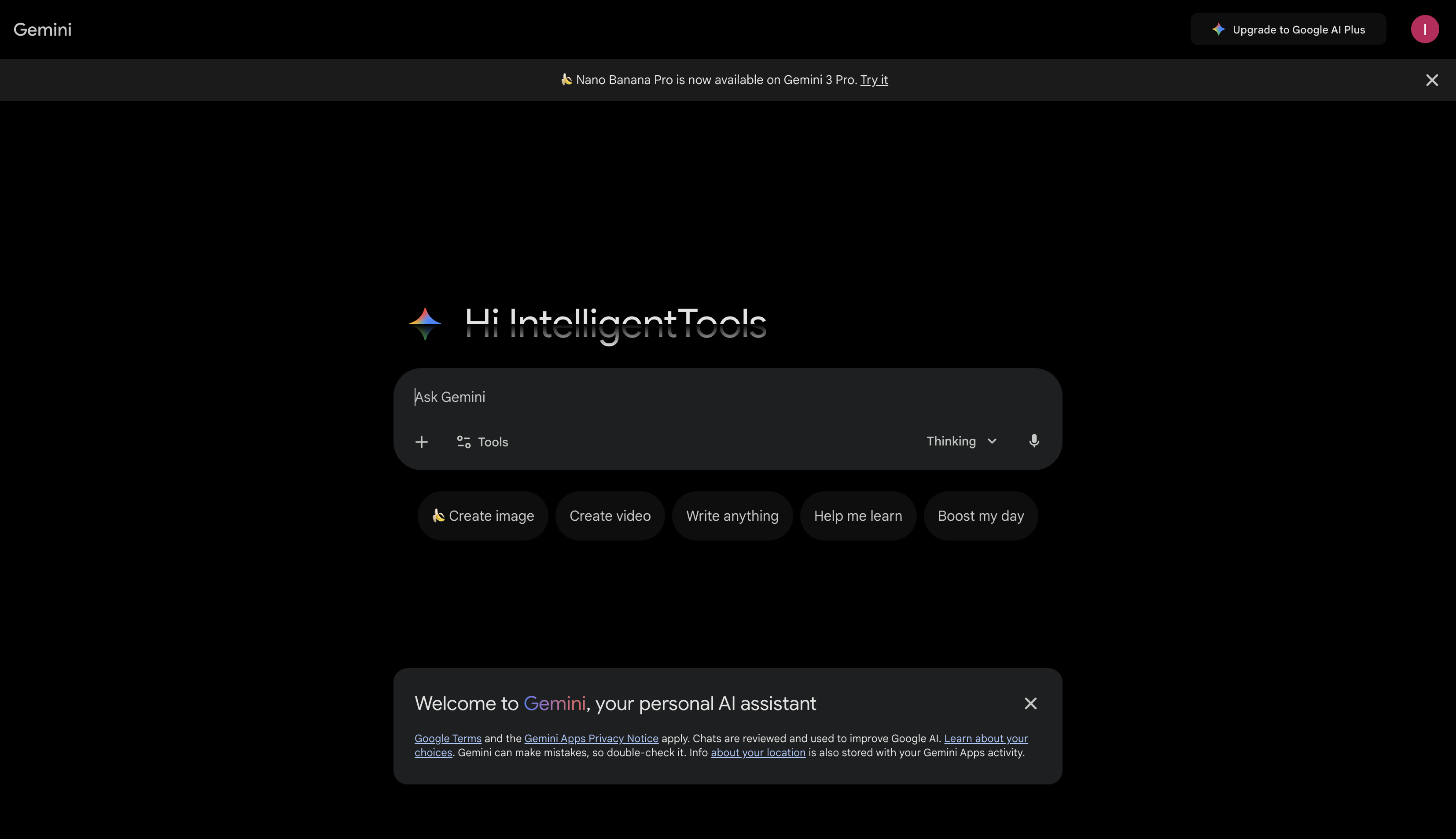
Here's what it looks like when you click the dropdown to select Thinking mode:

Step 3: Start Generating Type your prompt and hit enter. Be specific-the more Context you give it, the better your results.
Mobile App (For Quick Edits)
The Gemini mobile app works the same way:
- Download from App Store or Google Play
- Sign in with your Google account
- Switch to Thinking mode
- Start generating
The mobile app is great for quick edits and simple generations, but I prefer the desktop for anything serious because you get more screen real estate to review your images.
The Catch (There's Always a Catch)
Free Tier Limits You get roughly 3-4 high-quality Nano Banana Pro image generations before hitting your quota. After that, you're locked out for about 8 hours, after which the quota resets.
Is it annoying? Yes. Does it force you to be more intentional with your prompts? Also yes. Can you work around it? Keep reading.
Method 2: CapCut (10 Free Daily Uses)
This one surprised me. CapCut, the video editing app owned by ByteDance, integrated Nano Banana Pro directly into its AI Design feature.
How to Access:
- Download CapCut (desktop or mobile)
- Navigate to the AI Design section
- Look for the image generation feature
- You get 10 free Nano Banana Pro generations per day
Why This Works Well:
- Higher daily limit than Gemini's free tier
- Integrated into an editor, so you can immediately use the images
- No waiting period between generations
- Actually pretty fast
The Downside: You're stuck in CapCut's ecosystem. If you want to download the raw image without watermarks, you should export it correctly. But for quick social media content? This is actually perfect.
Method 3: Third-Party Platforms (The Power User Route)
Here's where it gets interesting. Several platforms offer access to Nano Banana Pro by routing your requests through their API allocation.
Felo.ai
Daily Limit: Near unlimited (in my testing, I got ~100+ before any throttling) Speed: Fast Quality: Full 4K output
This is my go-to when I've hit limits everywhere else. The interface is clean, no sign-up required (though you can create an account for better limits), and it just works.
nano-banana.ai
Daily Limit: 100-200 generations Speed: Medium Quality: Full resolution
Dedicated site just for Nano Banana Pro. Simple interface, no BS. Type prompt, get image. That's it.
nanobanana-pro.com
Daily Limit: ~500 (they claim, I haven't tested the full limit) Speed: Varies Quality: Full 4K
The highest claimed limit of the bunch. The site can be slow during peak hours, but if you need bulk generations, this might be your best bet.
OpenRouter (For Developers)

If you're technical, OpenRouter provides API access to Nano Banana Pro. They offer free tier credits that reset monthly, making it great for developers building applications.
How to Use:
- Sign up at openrouter.ai
- Get your API key
- Use their API endpoint for
google/gemini-3-pro-image. - Free tier includes $1-2 in credits monthly
When This Makes Sense:
- You're building an app or automation
- You want programmatic access
- You're comfortable with APIs
- You need consistent, repeatable results
The platform is straightforward - sign up, grab your API key, and start making requests. Perfect for developers who want to integrate Nano Banana Pro into their projects.
Method 4: Higgsfield AI (Twitter Integration)
This one's quirky but works. Higgsfield AI integrated Nano Banana Pro, and you can access it through Twitter/X.
- Follow @HiggsfieldAI on Twitter/X
- Tweet your prompt with their specific hashtag
- They generate and reply with your image
It's slower than other methods and feels old-school, but it works in a pinch.
Pro Tips for Better Results
1. Be Specific With Prompts
Bad: "a logo for my company." Good: "a minimalist tech company logo featuring a geometric circuit pattern in navy blue and electric blue, modern sans-serif font, transparent background, 4K resolution."
2. Use the "Suggest Improvements" Trick
Add "suggest improvements to this concept" at the end of your prompt. Allegedly, this activates extended reasoning mode. Does it work? Placebo or not, my images seem better when I do this.
3. Specify Output Requirements
Always mention:
- Resolution needed (4K, HD, etc.)
- Aspect ratio (16:9, 1:1, 9:16)
- Color palette or mood
- Style references if relevant
4. Iterate in Batches
Generate 3-4 variations of the same concept with slight prompt tweaks. Pick the best, refine it further. This works better than trying to get the perfect image on the first try.
5. Save Your Prompts
Keep a note file of prompts that worked well. Nano Banana Pro is consistent - good prompts will continue to produce good results.
Real Use Cases (What I've Actually Used It For)
1. Blog Featured Images
Instead of paying for stock photos or spending hours in Photoshop, I generate custom featured images for blog posts in minutes.
Prompt Example: "Create a modern tech-themed featured image showing abstract AI neural networks connecting, navy blue and purple gradient background, minimal geometric style, 16:9 ratio, 4K."
2. Social Media Content
Instagram posts, LinkedIn graphics, Twitter headers - Nano Banana Pro handles them all.
3. UI Mockups
Quick mockups for client presentations or internal discussions.
Prompt Example: "Clean dashboard UI mockup with dark mode, displaying analytics charts and user metrics, modern design system, Figma style, realistic interface"
4. Product Visualization
Visualizing product ideas before building them. Way faster than creating mockups manually.
5. Educational Infographics
Explaining complex concepts visually for tutorials or documentation.
Example: Step-by-Step Tutorial Infographic
Here's an example of an educational infographic generated by Nano Banana Pro - a visual guide on how to draw a rabbit:
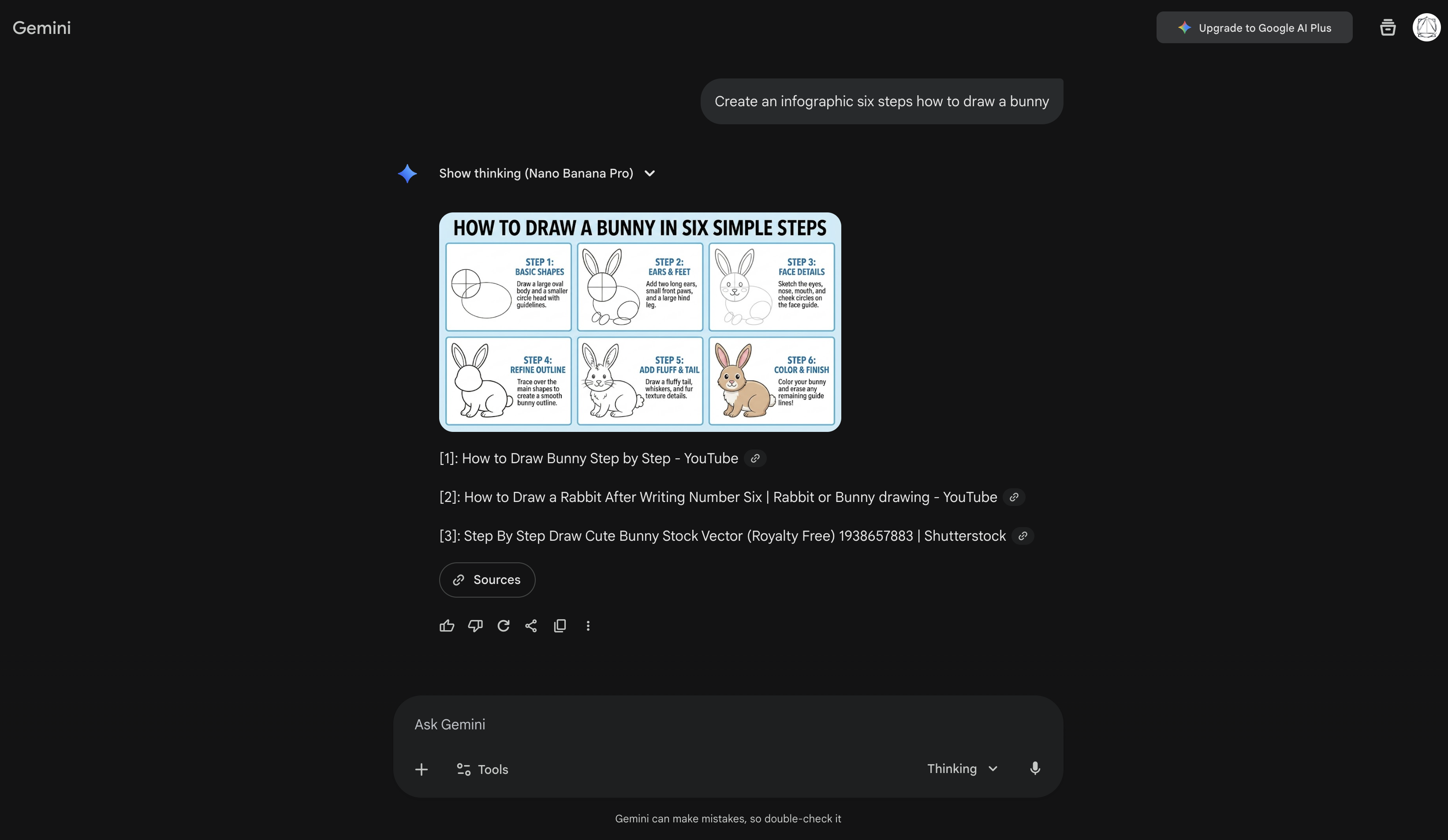
This is perfect for tutorials, documentation, or educational content. The text is clear, the layout is professional, and it was generated in seconds instead of hours in Illustrator.
Common Issues and Solutions
"I Hit My Daily Limit."
Switch platforms. Start with Gemini, move to CapCut, finish on Felo.ai. You'll have 100+ total generations across all platforms.
"Images Look Weird."
Be more specific in your prompts. Add style references, mention lighting, specify composition. Vague prompts = weird results.
"Text in Images is Blurry."
Explicitly mention "high-quality readable text" in your prompt. Also specify the text size and importance.
"Can't Access Thinking Mode."
Make sure you're signed into Google. Sometimes clearing the browser cache helps. If all else fails, try the mobile app.
"Third-Party Platforms Aren't Working."
These platforms sometimes go down or hit their own API limits. Always have 2-3 backup options.
The Ethics Bit (Because We Should Talk About This)
Is using third-party platforms legitimate? Yes, but understand what's happening. These platforms are paying for API access and sharing it with you. They might monetize through ads or data (read their privacy policies).
Copyright concerns: Images generated by Nano Banana Pro fall into a gray area. Google's terms suggest they're yours to use, but verify the current ToS before commercial use. When in doubt, add disclaimers.
AI-generated content disclosure: I personally disclose when images are generated by AI, especially for professional work. It builds trust and legally covers your bases.
Alternatives If Nano Banana Pro Isn't Your Thing
Not sold on Nano Banana Pro? Fair enough. Here are alternatives I also use:
- DALL-E 3: Through ChatGPT Plus, excellent for artistic styles
- Midjourney: Best for artistic and creative images, $10/month
- Stable Diffusion: Free if you run it locally, very customizable
- Leonardo.ai: Great free tier, good for game assets
Final Thoughts
Look, Nano Banana Pro isn't going to replace your design team or make you a professional artist overnight. But for developers, content creators, marketers, and anyone who needs quick, quality visuals without breaking the bank?
It's honestly a game-changer.
The fact that you can access such a powerful tool completely free (through multiple methods) is incredible. We're living in an era where the barrier to creating professional-looking visual content has basically disappeared.
My Recommendation:
- Start with Google Gemini's free tier to test it out
- Add CapCut for higher daily limits
- Bookmark Felo.ai for unlimited experimentation
- If you're technical, set up OpenRouter for API access
This combo gives you everything from casual use to serious production work, all at exactly $0 a month.
Want to explore more AI image generation tools? Check out our complete directory of AI creative tools.
Looking for other free AI tools? Browse our full catalog of AI tools to discover more ways to level up your workflow without spending money.
Sources: