
Related AI tool mentioned in article: Ampcode
Related AI tool mentioned in article: Claude
Related AI tool mentioned in article: Cursor

Should You Use Ampcode for Production Code? One Month In

Bojan Tomic
10 min read
ampcode
Should You Use Ampcode for Production Code? One Month In

I have been using Claude Code for about 6 months. I probably started as most of us did, just chatting with the chatbot, copying and pasting code from VS Code in the prompt, and hoping for the best. That workflow was honestly pretty bad to say the least, but I still thought it helped. And all the back and forth, well, I had to live with that. We have come a long way from that, and now it's a completely different story. With CC directly in the CLI, we are singing a different tune. But now it seems like it's finally time for that big leap of faith, letting the agent work without all the back-and-forth I currently have with Claude.

What Ampcode Actually Is

Amp is a coding agent that runs in your terminal and inside VS Code, Cursor, or Windsurf. Unlike other AI coding tools, where you're essentially pair-programming with a chatbot, Amp is designed to go off and do work while you're doing something else. The company calls this "agentic" coding, which is marketing speak for "the AI can actually finish tasks without you micromanaging every step."

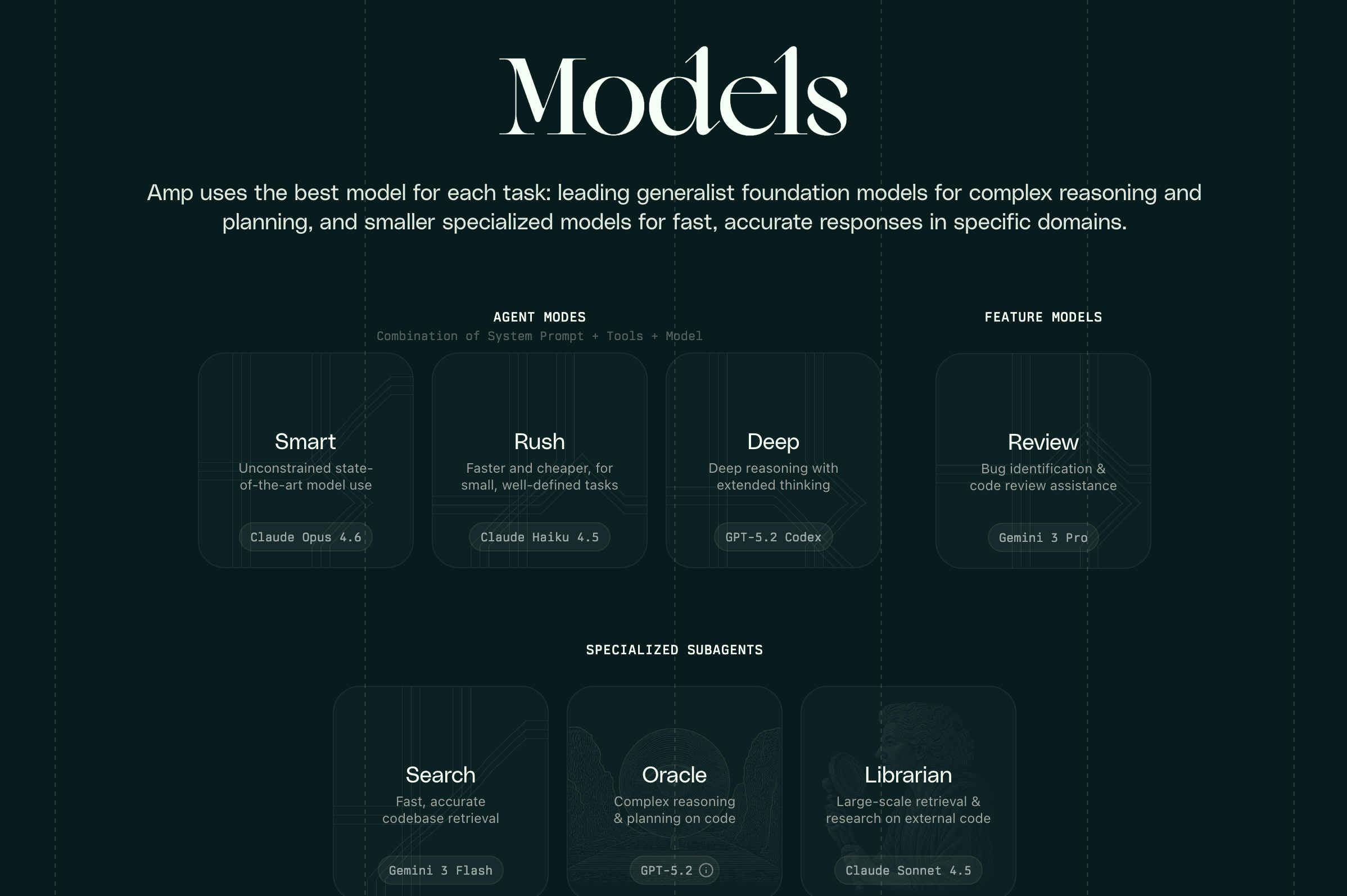
The interesting part isn't that it writes code. Every AI tool writes code now. The interesting part is that Amp has different specialized agents that coordinate with each other to handle complex refactoring without you holding their hand. There's Oracle, which appears to be their general-purpose coding agent. There's Librarian, which searches through codebases and documentation. And they just launched Deep mode, which thinks longer and plans more before touching your files.

How It Actually Works In Practice

The terminal interface is where Amp shows what it's really capable of. You give it a task like "migrate this Dygraphs visualization to uPlot," and it spawns off to work. One real example from their site shows a developer named Tomás who gave Amp 42 prompts to migrate a plotting library across 47 files. The agent added 1,238 lines, deleted 160, and touched about 60 files total. This is the kind of tedious refactoring work where you know what needs to happen, but the actual execution is mind-numbing.
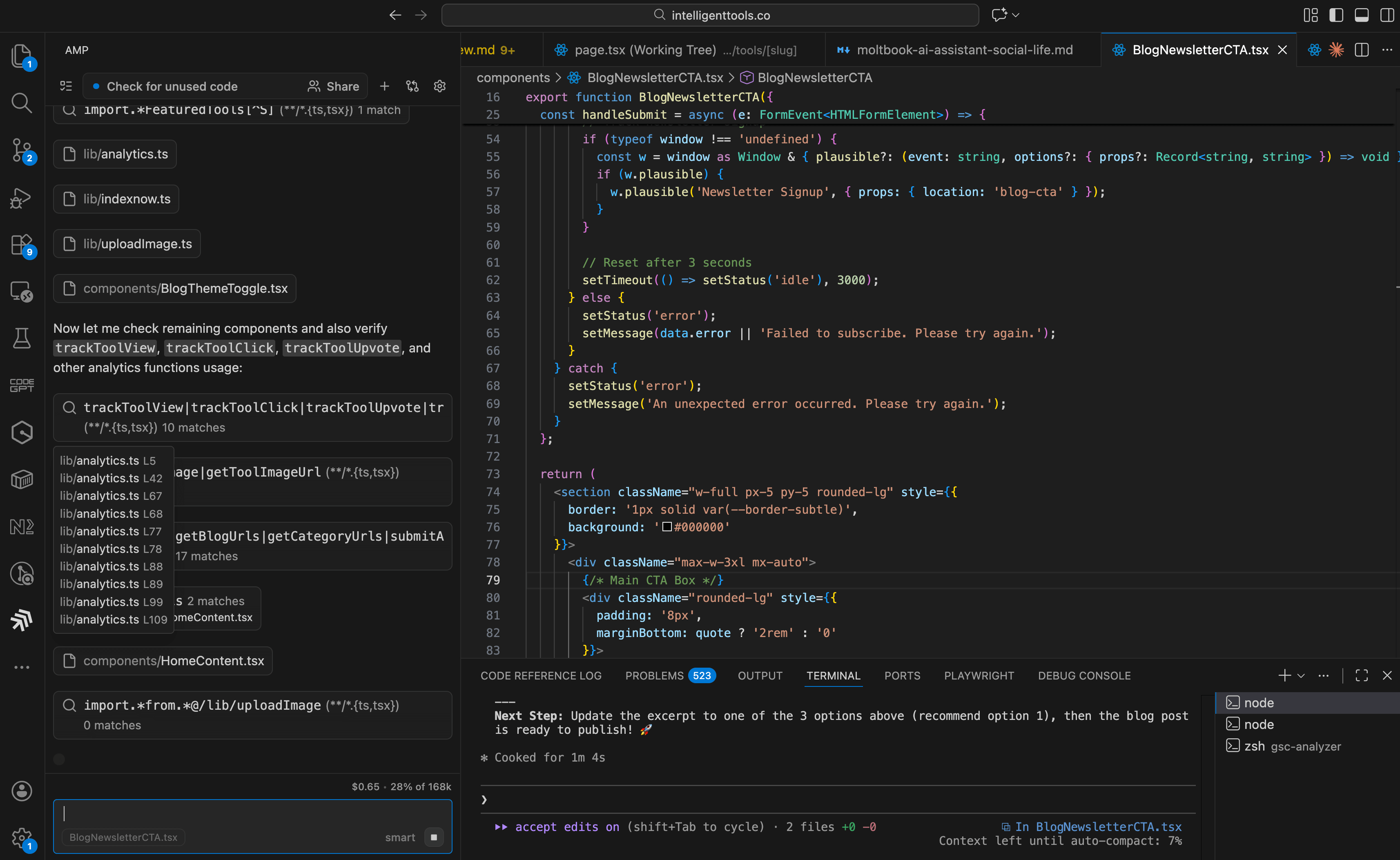
Ampcode agent working through a multi-file refactor

The VS Code extension puts the agent interface right in your editor sidebar. You can see which files it's touching, what changes it's proposing, and which specialized agent is currently working on them. This is crucial because watching an AI modify your codebase without any visibility is how you end up with a corrupted database and three hours of rollback work.
Ampcode agent interface in VS Code extension

What separates Amp from tools like Cursor or GitHub Copilot is the handoff mechanism. When you're working on something and realize you need a different specialist, you can tell Amp to hand off the task to that specialist. It packages up the context and switches agents automatically. This sounds minor until you're debugging a gnarly issue that requires both deep code analysis and documentation research. Instead of context-switching yourself, you just tell the agent to bring in the Librarian to search the docs while Oracle keeps working on the code.

The Deep Mode Difference

They launched Deep mode last week, and it's a fundamentally different approach to AI coding. Standard Amp responds quickly, makes changes, and asks for clarification. Deep mode disappears for minutes at a time, leaving me to plan the entire approach before writing a single line. I tested it on a healthcare software feature that required touching our authentication flow, database schema, and API endpoints. Standard mode would have asked me about each piece. Deep mode mapped out the entire change tree and then executed it in one shot.

The trade-off is time. Deep mode is slower upfront, but requires way less babysitting. For production work where I need to be confident the agent understood the requirements, I'm using Deep almost exclusively. For quick experiments or throwaway code, Standard mode is fine.
Subscribe to get insights from AI research, autonomous agents, and production deployments.

Join 37,000 people learning about AI and autonomous agents.

Real Workflows People Are Running

The pattern I keep seeing is developers using Amp for work they know how to do, but don't want to spend time on. Refactoring a component architecture across 11 files. Implementing an eval collection mechanism across 44 files. Migrating from one library to another. These are tasks where the hard part is keeping all the moving pieces consistent, not figuring out what needs to happen.

I have started small. Deep work is great for thorough investigations, like a full SEO code review to see where we can improve. Or check whether we have any security issues, such as XSS.

The Walkthroughs Feature Actually Makes Sense

Amp generates shareable walkthroughs that show exactly what changed and why. These aren't just git diffs with comments. They're interactive diagrams showing the flow of changes through your codebase. When an agent makes 50 file changes, you need a better way to review than scrolling through a massive diff. The walkthrough shows you the logic flow, which files connect to which, and why each change was necessary.

This is particularly useful for code review. Instead of asking your teammate to understand 1,200 lines of changes across 47 files, you send them the walkthrough that explains the migration strategy and shows the dependency chain. They can drill into specific files when they need detail, but the high-level view makes the review actually tractable.

What They Got Wrong And Fixed

Amp launched with a Tab feature that autocompleted code as you typed, similar to Copilot. They killed it in January, which is the right call. Autocomplete is a solved problem. Every editor has it. The differentiation isn't in suggesting the next line of code, it's in the agent taking over entire tasks so you don't have to think about implementation details.

They also removed custom commands in favor of skills, which appears to be their plugin system. This is probably the right architectural choice even though it breaks existing workflows. The trend across all these AI coding tools is moving from imperative commands toward declarative goals. Instead of "run this script, then do that thing," you tell the agent what you want, and it figures out the steps.

The Pricing Model Is Clever

The free tier gives you 10 dollars of API credits per day, ad-supported. That's enough to do serious work. Some users were exploiting this, so now you have to request it. When you hit the limit, you pay as you go with no markup on the API calls for individual developers. This is smarter than Cursor's subscription model because it aligns cost with usage. Heavy users pay more, light users pay less, and the free tier is generous enough that hobbyists can build real projects without having to pull out a credit card.

The ad-supported free tier is unusual for developer tools. I haven't seen the ads yet, so I can't comment on how intrusive they are. If they're contextual and relevant to what I'm building, fine. If they're shoving crypto scams in my face while I'm debugging auth flows, that's a different conversation.

What This Means For How We Write Code

The workflow change is subtle but important. I'm not using Amp to write code faster. I'm using it to batch boring work so I can focus on architecture decisions and edge cases. When I need to refactor a component that's used in 30 places, I describe the new pattern and let Amp update all the call sites. When I need to migrate from one API to another, I spec out the mapping and let Amp handle the mechanical translation.

This only works if you trust the agent enough to run unsupervised. That requires good tooling for reviewing changes, rolling back mistakes, and understanding what the agent actually did. Amp's walkthrough feature and file-by-file change tracking make that feasible. I still review everything, but I focus on intent and correctness, not syntax or boilerplate.

The agents are getting good enough that the bottleneck is no longer code generation. The bottleneck is communicating what you want clearly enough for the agent to build the right thing. That's a different skill from writing code, and it's not obvious that being a great programmer makes you great at prompting agents. We're all figuring this out in real time. Unfortunately, all of this is still far from deterministic, so no agent can run without some serious moderation.

The Security Implications Nobody Mentions

Amp has access to your entire codebase, your git history, and in some configurations, your terminal environment variables. If you're working on proprietary code or handling sensitive data, you need to think about what's being sent to which AI providers. Their docs mention support for multiple models, including GPT-5 and Sonnet 4, which means your code may touch multiple third-party APIs depending on the agent mode you're using.

The testimonials mention people appreciating the "level of polish" compared to other tools, suggesting that Amp is doing something different in how it orchestrates model calls. But the underlying trust model is the same. You're giving an AI agent write access to your repository and hoping it doesn't do something catastrophic. The risk isn't malicious behavior, it's that the agent misunderstands requirements and makes changes that look right but break subtle invariants.

I'm running Amp on a dedicated branch and reviewing every commit before merging to main. That's the responsible approach for production code. But I've seen people on Twitter running it directly on their main branch, which is either brave or reckless depending on how good their test coverage is.

What Makes This Different From Cursor

I've been using both Cursor and Amp for the past month. Cursor is great for inline suggestions and chat-based coding. You're still driving, Claude or GPT is suggesting. Amp inverts that. The agent drives, and you review. For small changes and exploratory work, Cursor's approach works better. For large refactorings and systematic changes, Amp's approach is more productive.

The multi-agent coordination is Amp's real differentiator. Cursor has a single model helping you. Amp can bring in specialized agents for different subtasks. When I'm migrating a database schema, Librarian searches the docs for migration best practices while Oracle plans out the schema changes. That coordination reduces the number of times I need to interrupt the agent to provide context.

Ampcode specialized agent models and capabilities

The trade-off is that Amp has a steeper learning curve. You need to understand which agent to use for each task, how handoffs work, and when to use Deep mode versus Standard mode. Cursor is just "talk to Claude in your editor." That simplicity has value, especially for developers who don't want to think about agent orchestration.

I'm using both. Cursor for quick edits and pair programming sessions. Amp for refactorings and architectural changes that touch many files. The right tool depends on whether I want to maintain tight control or delegate the entire task.

The Bottom Line

Amp is production-ready for developers who are comfortable reviewing AI-generated code and working on feature branches. The ability to hand off entire refactorings to specialized agents is a real productivity gain for the right kind of work. But it requires trusting an AI to make architectural decisions, and not everyone is ready for that yet. I'm cautiously optimistic that this is where coding tools are headed. We'll see if I still feel that way after the agent inevitably breaks something important.

Free Tools

View All

Vibe Coding Tools

View All
ShipFast AI tool logo

ShipFast

Launch your SaaS in days, not months

Next.js SaaS boilerplate with AI integration and auth. Authentication, Stripe payments, database included. Launch production SaaS startups 10x faster.

Paid
Codeium AI tool logo

Codeium

Free AI coding assistant for individuals

Free AI code completion in VS Code, IntelliJ, and 20+ editors. Fast, private code suggestions with context awareness. GitHub Copilot alternative option.

Freemium
GitHub Copilot AI tool logo

GitHub Copilot

Your AI pair programmer that writes code with you

AI coding tool to accelerate development. See why developers choose this.

Paid
Vercel AI SDK AI tool logo

Vercel AI SDK

Open-source TypeScript framework for building AI applications with streaming, tools, and RAG

AI coding tool to accelerate development. See why developers choose this.

Free
Replit Ghostwriter AI tool logo

Replit Ghostwriter

AI Code Assistant for Replit

AI coding tool to accelerate development. See why developers choose this.

Paid
Tabnine AI tool logo

Tabnine

Privacy-focused AI code completion

AI coding tool to accelerate development. See why developers choose this.

Freemium
Sourcegraph Cody AI tool logo

Sourcegraph Cody

Codebase-aware AI coding assistant that understands your entire repository

AI coding assistant with full codebase awareness. Understands entire repository for better code recommendations, refactoring, and automated code generation.

Freemium
Blackbox AI AI tool logo

Blackbox AI

AI-powered code search and autocomplete

AI coding tool to accelerate development. See why developers choose this.

Freemium
Codacy AI tool logo

Codacy

AI-powered code quality and security

Code review automation powered by AI. Catch issues before production.

Freemium
v0 AI tool logo

v0

AI-powered UI design and generation

AI coding tool to accelerate development. See why developers choose this.

Freemium
Hugging Face AI tool logo

Hugging Face

The AI community and model hub

AI coding tool to accelerate development. See why developers choose this.

Freemium
Unstructured AI tool logo

Unstructured

Document ingestion and parsing library for converting PDFs, images, and HTML into structured data for RAG

Convert PDFs, images, documents to structured data and text easily. Document parsing and extraction with open-source and cloud APIs for AI data preparation.

Free