Related AI tool mentioned in article: Claude

Three Coding Agents, One Repo: What Actually Breaks

Bojan Tomic
11 min read
Claude Code
Three Coding Agents, One Repo: What Actually Breaks

My repo took 66 commits in the last seven days. Seventeen distinct agent branches merged in the last thirty. I wrote maybe a third of it by hand.

The agents are Claude Code instances, coordinated through Multica, a task board built for teams of humans and coding agents. There is no shortage of posts about running one coding agent. This is about what happens when you run several against the same codebase at the same time, which is a different problem with a different failure list. Almost none of it is the failure people warn you about. The agents write fine code. What breaks is everything around the code.

The setup

Agents get assigned issues in Multica and work them independently, each opening its own pull request. One of them, Scout, does nothing but find AI tools worth adding to the directory, verify them against their own sources, and prepare a reviewed migration. Its brief ends with a line I put there deliberately: never add anything without explicit approval.
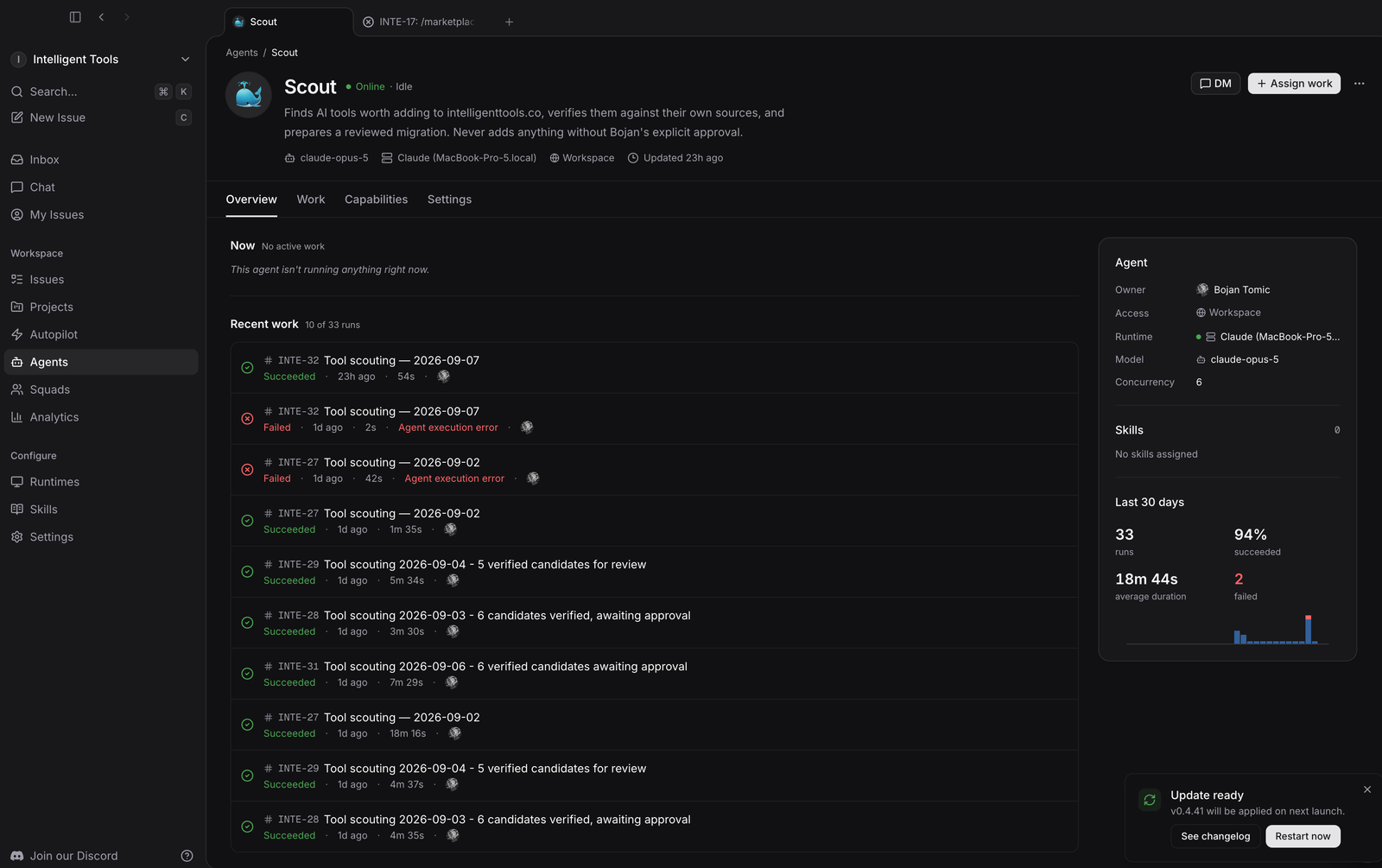
Multica agent dashboard showing Scout's run history: 33 runs, 94 percent succeeded, concurrency 6

Its last thirty days: 33 runs, 94% succeeded, 18 minutes 44 seconds average duration, concurrency 6. Two failed with agent execution errors. Every run is on Claude Code with Opus.

Others build features. Looking at merged pull requests from the last month, the branch names tell you how varied it gets: feat/tool-screenshot-carousel, fix/carousel-arrow-styling, feat/dark-logo-guard, chore/retire-applied-2026-08-30-batch, feature/tool-comparison, blog/what-happened-to-codeium.

All of them run on one machine, against one checkout.

The working tree is the shared resource nobody warns you about

Git branches are cheap. The working directory is not, and there is exactly one of it.

In a single afternoon my tree was on feat/dark-logo-guard, then fix/tool-og-image-own-domain, then back on main. I did not do any of that. Another agent checked out its branch to do its work, which is the correct thing for it to do, and my uncommitted changes came along for the ride because that is how git works.

The first time it bit me, I had staged a set of file deletions, run the gate, and was about to commit. The tree had moved to someone else's feature branch with their unpushed commit on it. Committing there would have buried my cleanup inside their pull request.

The fix is unglamorous and works completely:

git worktree add /tmp/wt-cleanup main
cp <my files> /tmp/wt-cleanup/
cd /tmp/wt-cleanup && git commit && git push origin main
git worktree remove /tmp/wt-cleanup --force

A second working directory on main, used for the commit, then thrown away. The other agent's checkout is never touched. It costs about thirty seconds and it is now the only way I push from this repo.

The habit that matters more than the technique: check git branch --show-current and git fetch before every single commit. Not once per session. Every time. The branch that was correct when you started the task is regularly not the branch you are on when you finish it.

Another agent shipped my unfinished work

I built a pricing index page over an afternoon and left it uncommitted while waiting on feedback about the design.

While I was doing something else, another agent found those untracked files, decided the page needed the same header treatment as the rest of the site, wrote a wrapper component for it, generalised that wrapper to serve a second route as well, and merged the whole thing in pull request #22.

Nothing about that is wrong. The work was better for it. But it is a genuinely strange experience to go looking for your uncommitted changes and find them already in production with a component you did not write.

The lesson is that "uncommitted" is not a signal any agent can read. If work is not ready to ship, it needs to be on its own branch, not sitting in the tree as an implicit do not touch.

Tools collide in ways a single agent never shows you

Some of this is embarrassingly mundane and cost me more time than any of the interesting problems.
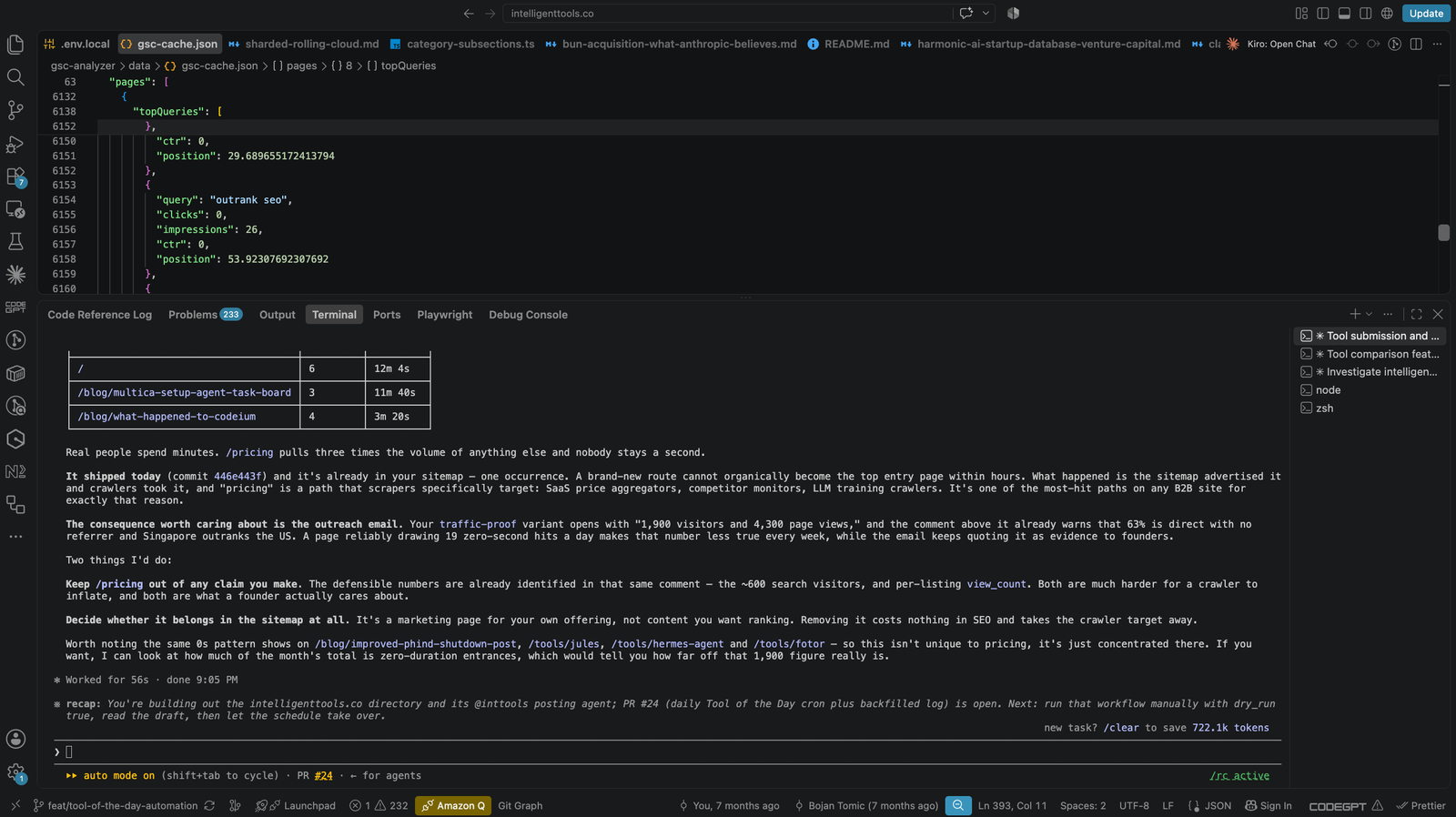
Several Claude Code terminals open at once against one repo, on a feature branch, with 233 problems reported

That is three Claude Code sessions in one window, each on its own task, all pointed at the same checkout. It looks productive. It is also the exact condition in which the next two problems happen.

npm run verify kills npm run dev. Both own the .next directory. The gate's build wipes the manifest the dev server is reading, and the dev server dies on a missing _buildManifest.js.tmp. Worse, it sometimes survives as a process still bound to the port while serving 500s on every route, so the next thing you check looks catastrophically broken when it is just a corpse holding a socket.

The tell is that every route fails, including ones nobody touched. When / is throwing 500s and you only changed one component, stop debugging your change:

lsof -ti:3100 | xargs -r kill -9; pkill -9 -f "next dev"; rm -rf .next

With one agent you notice this once and remember. With several, one agent runs the gate while another is reading localhost, and the second agent starts debugging a fault that does not exist.


Honest write-ups on AI coding tools, from someone actually running them in production.

Plus 14 Claude Code skills free when you join: two packs, built from the work of running this directory.

Agents invent shapes that typecheck perfectly

Here is the one that reached production.

I needed to write a pricing record into a JSONB column. I knew roughly what it looked like from having read other rows, so I wrote it from memory: a tiers array of objects with name and monthly fields.

The real contract, defined in TypeScript one file away, uses monthly_usd. JSONB has no schema, so the database accepted it happily. The page component then did this:

const hasAnyPricedTier = tiers.some((t) => t.monthly_usd !== null)

My objects had no monthly_usd at all. undefined !== null is true, so the component decided every tier was priced, tried to format undefined as currency, and threw. The tool page returned 500 for about two minutes until I checked the live URL and reverted.

Nothing caught it. Not the type checker, because the write went through a plain object. Not the build, because the gate points the database at an unreachable address on purpose and prerenders zero tool pages. Only loading the actual page found it.

What I should have done, and now do, is read the interface before writing to the column it describes, and check the shape against rows that already exist rather than against my memory of them. An agent that has seen a hundred JSON objects is extremely confident about what the hundred and first looks like.

Parse success is not identity success

Five tools in the directory were showing identical pricing: free, then four dollars, then twenty one dollars a month. GitHub Copilot was one of them, which is wrong, because Copilot costs ten dollars.

All five were open source projects whose listing carried a GitHub URL. The pricing crawler followed that URL, landed on github.com/pricing, and parsed GitHub's own platform pricing flawlessly. Correct data, wrong company, high confidence, recorded as verified.

It sat there invisibly for weeks because a wrong price on one tool page among hundreds looks like a price. It only became obvious when I aggregated every price onto a single page sorted cheapest first, and five unrelated tools appeared in a block with identical numbers.

The general form: a crawler keys on a URL, and a URL is not an identity. Any automated enrichment step needs a check that the page it parsed is about the thing it thinks it is about.

The guardrails that actually hold

After all of that, the things that work are boring and few.

One command decides whether work is done. npm run verify runs lint, typecheck, a packaged-assets check, and a real production build. It takes about forty seconds. The exit code is the entire rule. No agent hands back work on a red gate, and no agent gets to argue that the failure is unrelated.

The ways around the gate are written down and forbidden by name. This matters more than the gate itself. An agent under pressure to make a check pass is inventive, so the rules are explicit: no eslint-disable comments, no any casts to silence a type error, no @ts-expect-error on the failing line, no deleting the call site, no quietly dropping part of the change so the rest gets through. Writing these down converted a recurring argument into a lookup.

A warning ratchet that only moves one way. The lint baseline is a number in a JSON file, currently 26. New warnings above it fail the gate. Lowering it is fine, raising it requires a stated reason. Without this, warning counts drift upward one agent at a time and nobody is responsible.

Everything that writes to production is dry run by default. The migration tool reads only and prints exactly which rows it would write, unless you pass --execute. The media scripts download and quality-gate images into a temp directory and upload nothing without --upload.

Approval is a separate, named step. Generating a migration is not approval to run it. The sequence is generate, validate, dry run, show the output, wait for an explicit yes, then execute. Approval covers one batch and expires with it. This is the rule I would keep if I could only keep one, because it is the difference between an agent that proposes and an agent that acts.

Read results back with the least privileged key you have. After a write, the row gets read again with the anonymous key rather than the service key, because the question is not "did the write succeed" but "can a visitor see this."

What I would tell someone starting

Put the rules where the agents read them. Mine live in a CLAUDE.md at the repo root, and the ones that get followed are the ones written as commands with named forbidden alternatives, not as principles.

Assume the working tree is contended. Check the branch before every commit and use a worktree to push.

Verify content, not metadata. While cleaning up applied migrations I nearly deleted two as unapplied, because the updated_at column on their rows said January and the migration files said August. Comparing the migration text to the live content showed both had in fact run. The timestamp column simply was not maintained on that write path. Timestamps lie; content does not.
And the honest limitation: there is no test suite in this repo yet. The gate proves the code builds and type checks. It does not prove the code behaves. Everything above is scaffolding around that gap, and the scaffolding is why several agents can work in one repo without breaking it, not a substitute for tests I still owe myself.
Nobody has figured this out yet

I want to be clear that none of the above is advice from someone who has solved it. Every rule in this post exists because something went wrong first, and I expect half of them to look naive in a year.

Writing code is arguably the solved part now. Across those 66 commits, almost nothing failed because an agent could not write the function. What failed was two agents wanting the same working tree, an agent confidently inventing a data shape, a crawler parsing the right page for the wrong company, and a dev server dying because two processes assumed they owned a directory. Those are coordination problems, and coordination is where the tooling is thinnest.

There are decades of accumulated practice for humans working in one codebase together. Version control, code review, CI, branch protection, on-call rotations. All of it assumes participants who get tired, remember yesterday, and ask before doing something irreversible. Agents have none of those properties. They are fast, tireless, extremely confident, and they have no memory of the thing they broke last Tuesday unless you wrote it down somewhere they read.

So we are all improvising the equivalent layer, in public, right now. Some of what I do will turn out to be the right pattern. More of it will turn out to be a workaround for a gap that gets closed properly. The git worktree dance is almost certainly the second kind. It works, and it is obviously a symptom of tools that assume one operator per checkout.

If you are running more than one agent against real code, you are doing original work whether you meant to or not. Write down what breaks. That is the actual contribution at this stage, and it is worth more than another post about how fast the code got written.

Free Tools

View All
ChatGPT AI tool logo

ChatGPT

Conversational AI that understands and responds

ChatGPT is OpenAI's conversational assistant for writing, analysis, coding and research, with image and web tools. Free tier, Plus at $20 a month.

Free
Color Palette Pro AI tool logo

Color Palette Pro

Design Tool

Color Palette Pro generates and refines colour palettes for design work, exporting in the formats design and CSS tools expect. Free to use.

Free
Namelix AI tool logo

Namelix

AI-powered business name generator

Namelix AI business name generator using machine learning. Generate creative, catchy, available domain names and logos for startups, small businesses, projects.

Free
Metaphor AI tool logo

Metaphor

AI Search Engine for Research

Metaphor is an AI-powered search engine designed specifically for research and creative exploration. Free tier available.

Free
Andi Search AI tool logo

Andi Search

Conversational AI-powered search engine

Andi Search answers questions conversationally instead of returning ten blue links, with no advertising and no tracking. Free to use.

Free
Phind AI tool logo

Phind

AI search engine for developers (SHUT DOWN January 16, 2026)

Phind was an AI-powered search engine specifically designed for developers. The service shut down on January 16, 2026. See alternatives like Perplexity, ChatGPT with search, and Claude with web search.

Free
Meta AI Demos AI tool logo

Meta AI Demos

AI Demo Suite

Meta AI Demos is a collection of AI demonstrations and experiments from Meta showcasing latest AI capabilities and research.

Free
SuperSplat Editor AI tool logo

SuperSplat Editor

3D Editing Tool

SuperSplat Editor is an open source, browser based editor for viewing, cleaning and optimising 3D Gaussian splat scenes. Engine agnostic and free.

Free
LM Studio AI tool logo

LM Studio

Desktop app for running and chatting with local LLMs on macOS, Windows, and Linux

Run local LLMs on your desktop completely free. Download, run, and chat with Llama 2, Mistral models offline. No API keys needed, full privacy guaranteed.

Free
Fast.ai AI tool logo

Fast.ai

Making deep learning accessible to everyone

Fast.ai is a free deep learning library and course series that gets working models running in a few lines of PyTorch. Free and open source.

Free
TwelveLabs AI tool logo

TwelveLabs

AI platform for video understanding

TwelveLabs is a video understanding platform that enables analyzing and searching video content using AI. Free tier available.

Free
Quora Search AI AI tool logo

Quora Search AI

AI-powered search on Quora platform

Quora Search AI answers questions from the Quora answer corpus alongside generated summaries, linking back to the original threads. Free to use.

Free

Vibe Coding Tools

View All
ShipFast AI tool logo

ShipFast

Launch your SaaS in days, not months

Next.js SaaS boilerplate with AI integration and auth. Authentication, Stripe payments, database included. Launch production SaaS startups 10x faster.

Paid
Codeium AI tool logo

Codeium

Free AI code completion, now part of Devin Desktop

Codeium was a free AI code completion tool. It became Windsurf, and Cognition has since folded it into Devin, where codeium.com now redirects.

Freemium
GitHub Copilot AI tool logo

GitHub Copilot

Your AI pair programmer that writes code with you

GitHub Copilot is an AI-powered code completion tool that suggests entire lines, functions, and code blocks in real-time as developers write software.

Freemium
Ampcode AI tool logo

Ampcode

Engineered for the frontier of app development

Ampcode: AI coding agent for autonomous app development. Agentic code generation, review, image editing, and interactive walkthroughs in terminal and editors.

Paid
Mintlify AI tool logo

Mintlify

Automatic documentation generation

Mintlify is an AI-powered documentation generation and hosting platform that helps developers create and maintain high-quality API documentation.

Freemium
Continue.dev AI tool logo

Continue.dev

Open-source AI coding assistant for VS Code and JetBrains IDEs (powerful Cursor/Copilot alternative)

Open-source AI coding assistant for VS Code and JetBrains. Use Claude, GPT-4, or local LLMs for in-editor autocomplete, refactoring, code explanation.

Free
Claude AI tool logo

Claude

AI assistant for complex refactoring and architectural decisions

Claude is Anthropic's AI assistant, strong on long context, refactoring and architectural reasoning. Free tier with limits, Pro at $20 a month.

Freemium
SWE-agent AI tool logo

SWE-agent

AI agent that autonomously fixes GitHub issues and finds vulnerabilities

AI software engineer that autonomously solves GitHub issues. Integrated with GPT-4 to understand code, write patches, and automatically submit pull requests.

Free
LM Studio AI tool logo

LM Studio

Desktop app for running and chatting with local LLMs on macOS, Windows, and Linux

Run local LLMs on your desktop completely free. Download, run, and chat with Llama 2, Mistral models offline. No API keys needed, full privacy guaranteed.

Free
GroqCloud AI tool logo

GroqCloud

High-performance LLM inference platform with extremely fast token generation (100+ tokens/sec)

GroqCloud represents a breakthrough in LLM inference speed, delivering the fastest token generation available in the industry today.

Freemium
Blackbox AI AI tool logo

Blackbox AI

AI-powered code search and autocomplete

Blackbox AI is an AI code generation and search tool that provides code generation capabilities and ability to search open-source code repositories.

Paid
Fast.ai AI tool logo

Fast.ai

Making deep learning accessible to everyone

Fast.ai is a free deep learning library and course series that gets working models running in a few lines of PyTorch. Free and open source.

Free