Related AI tool mentioned in article: Claude
Related AI tool mentioned in article: Cursor
Related AI tool mentioned in article: Kiro

Kiro CLI vs Claude Code: Same Opus, Different Feel

Bojan Tomic
7 min read
Kiro
Kiro CLI vs Claude Code: Same Opus, Different Feel

I use two AI coding tools every day. One I chose. One my employer pays for. This is about the second one, and about what you actually learn when you run the same model through two different harnesses.

The tool is Kiro, specifically Kiro CLI rather than the Kiro IDE, and I want to be upfront about why it is on my machine at all: it is discounted through my company's AWS spend and I am not the one paying. That is not a recommendation. It is the most common reason anybody uses any enterprise developer tool, and pretending otherwise would be dishonest.
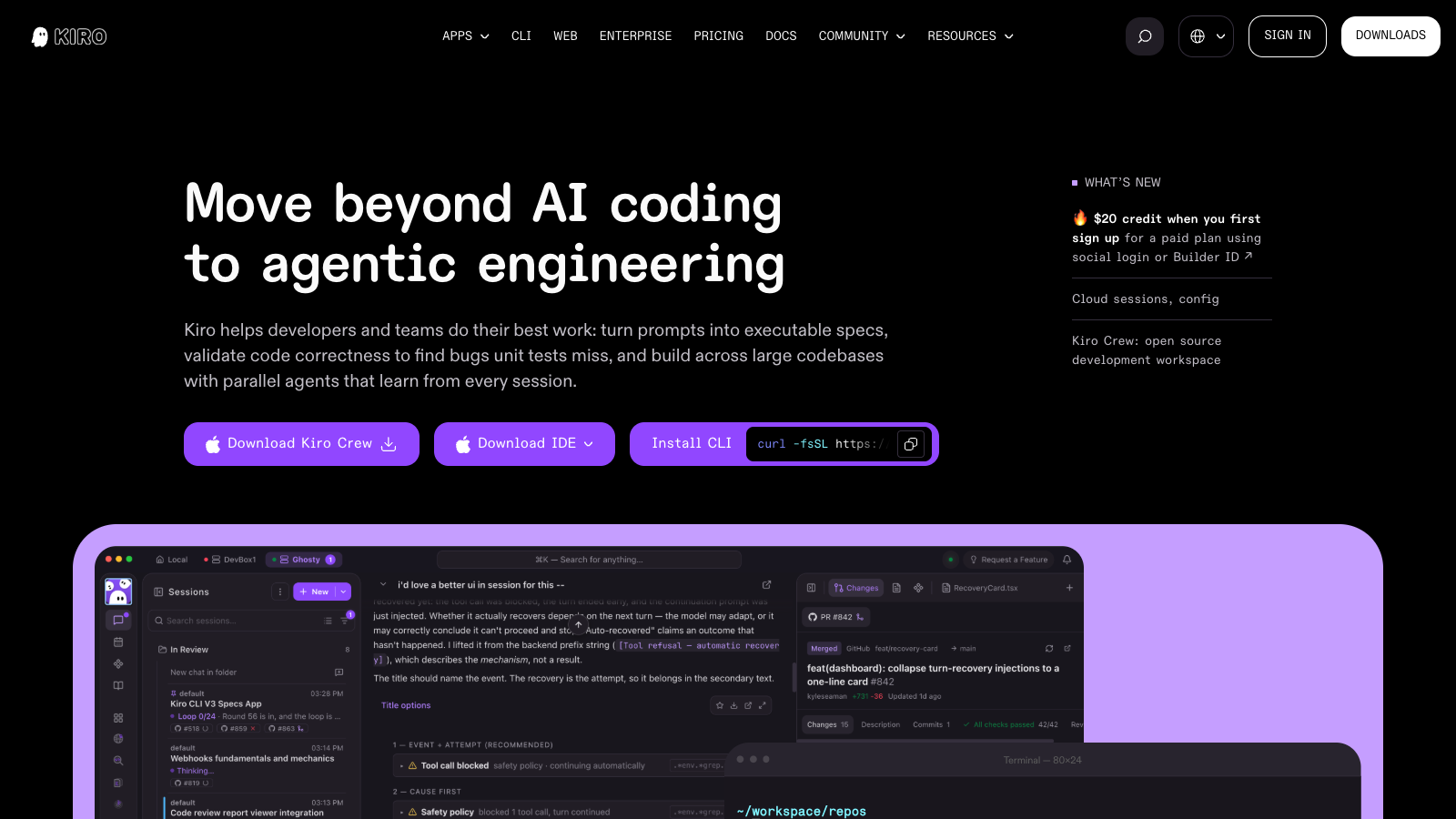
The Kiro homepage headlined Move beyond AI coding to agentic engineering, with three buttons: Download Kiro Crew, Download IDE, and Install CLI showing a curl command

Why the CLI and not the IDE

Kiro ships as an IDE, a CLI, a web interface and now a thing called Crew. The IDE is the flagship, and it is where the spec-driven workflow is best presented.

I have no intention of moving off VS Code. I have years of muscle memory, extensions I rely on, and settings I have forgotten I configured. The value an AI tool would have to add to justify relearning an editor is enormous, and no coding assistant currently clears that bar. Not Kiro, not Cursor, not anything.

So the CLI is the only version I would ever have installed. It runs in the terminal, sits next to the editor I already use, and asks nothing of my setup. If Kiro were IDE-only I would not be using it, discount or not.

To their credit, Kiro seems to know this. Look at the hero above: "Install CLI" sits as a peer to "Download IDE", with the curl command right there in the button rather than buried three clicks into the docs. The CLI has its own top-level nav item and its own version number, currently 3.0. This is not a companion utility shipped as an afterthought.
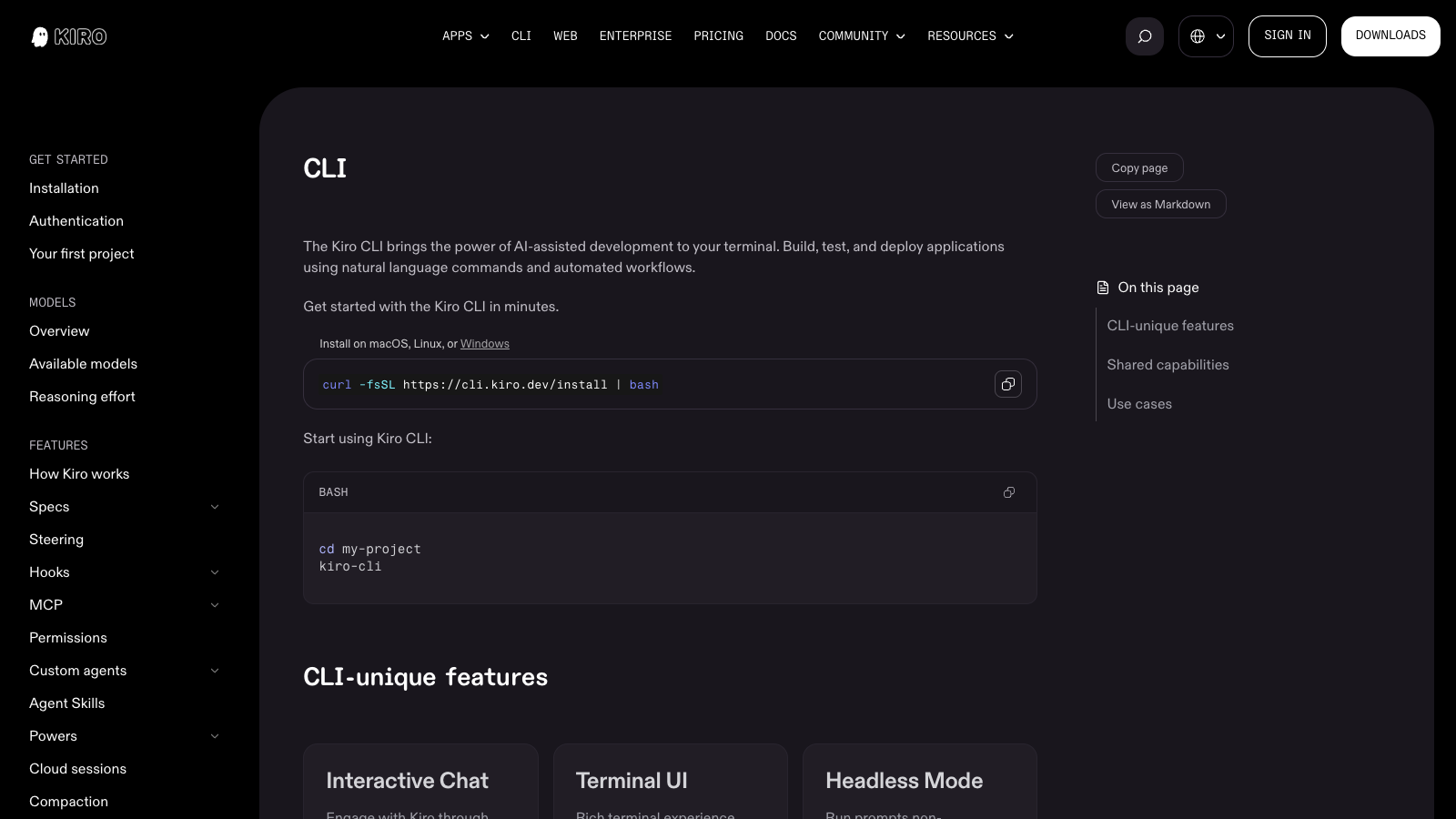
The Kiro CLI documentation page showing the curl install command, the kiro-cli invocation, and CLI-unique features including Interactive Chat, Terminal UI and Headless Mode

Install is one line, then kiro-cli inside a project directory. The docs list features that only exist in the CLI: a terminal UI, headless mode for CI, voice mode. That is worth saying to anyone building these tools, because for a large group of us the CLI is not the lesser version, it is the only version that is adoptable at all.

Both of them are running Opus

Here is the part that makes the comparison interesting rather than a preference.

I run Claude Opus in Claude Code on my personal account, and I run Opus through Kiro CLI on the company one. Same model. Same weights. Same reasoning.
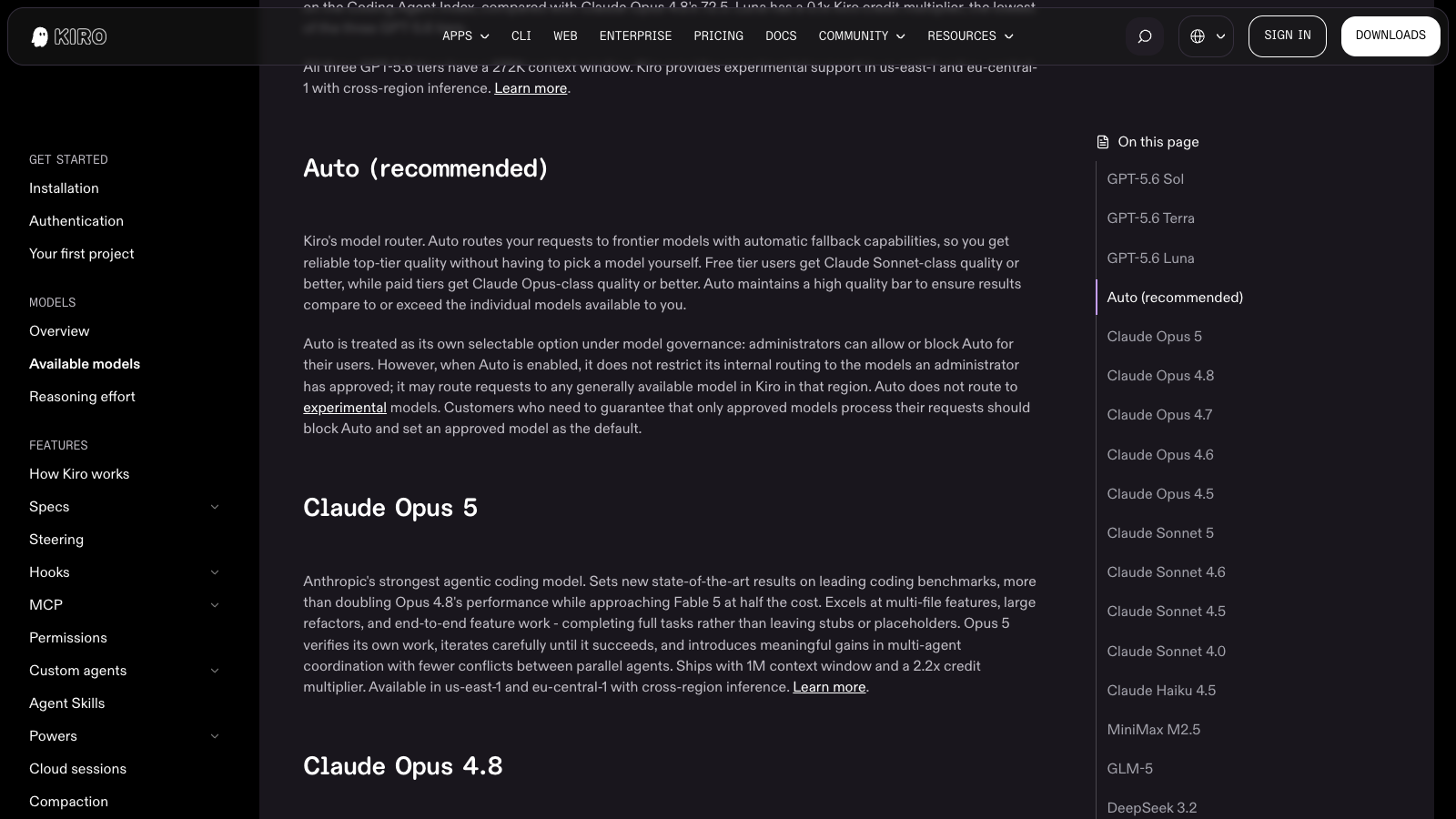
Kiro's available models documentation listing Claude Opus 5 with a 1M context window and a 2.2x credit multiplier, above a sidebar listing every selectable model

This is not me assuming. Kiro documents Claude Opus 5 as a selectable model with a 1M context window, alongside a menu that runs from GPT-5.6 down through open weight models like DeepSeek and Qwen. Pick Opus in both tools and the thing answering you is the same thing.

Which means when I notice a difference between the two, the model is not the variable. What I am comparing is everything around it: how the tool builds context, how it streams output, how it handles a long task, how quickly it starts doing something after I hit enter. The harness, not the intelligence.

Most comparisons of AI coding tools are really model comparisons wearing a costume. This one cannot be, and that turns out to be clarifying.

What I actually notice

They are more alike than different. If you dropped me into a session with the branding removed, most of the time I could not tell you which one I was in. Both take a prompt, work across files, explain what they did. The gap between AI coding tools in 2026 is much smaller than the marketing suggests, particularly when the model underneath is identical.

Kiro feels sluggish at times. This is the one consistent difference. There are moments, usually at the start of a task or partway through something long, where it sits there and Claude Code would already be moving. I want to be careful about this claim: I have not benchmarked it, I am describing a feel, and feel is exactly the kind of thing that is subject to my own expectations. But it is consistent enough that I notice it, and I notice it in the direction of Claude Code being faster.

The spec-driven workflow is real but not free. Turning a prompt into requirements and a task list before writing code is genuinely useful on work that spans several files. On a small change it is overhead, and I skip it. That is not a criticism, it is what the feature is for.

The part I do not feel, because I am not paying

Kiro does not sell seats with a usage allowance in the way Claude Code does. It sells credits, and every model spends them at a different rate.

Kiro pricing showing five plans: Free at $0 with 50 credits, Pro $20 with 1,000, Pro+ $40 with 2,000, Pro Max $100 with 5,000 and Power $200 with 10,000 credits

Opus 5 carries a 2.2x credit multiplier. GPT-5.6 Luna carries 0.1x. So the model I use by default burns the budget roughly twenty two times faster than the cheapest option on the menu, and add-on credits run $0.04 each once the monthly allocation is gone. The free tier does not include Opus at all, only Sonnet 4.5 and the open weight models.

I notice none of this, because the bill is not mine. That is worth stating plainly in a review, because it is the single biggest difference between my experience of this tool and yours. Someone paying $20 a month out of their own pocket is making a constant decision about whether this task deserves the expensive model. I never make that decision. I always pick Opus. Any judgement I offer about Kiro is a judgement made without the constraint that would shape most people's use of it.

What this means if you are choosing

If your company is paying, particularly if you already have AWS spend, Kiro is a perfectly reasonable thing to have. It is competent, it runs the model you want, and the CLI stays out of your editor's way. I would not fight to remove it.

If you are paying personally, I do not think this is the one I would pick. Claude Code feels quicker for the same model, and speed compounds over a working day in a way that features do not. The credit multipliers also mean the honest price of using Opus on Kiro is not the sticker price, and you would feel that in a way I do not.

The summary is that my choice was made by a procurement decision rather than by me, which is how most enterprise tooling arrives. What surprised me is how little that costs. Five years ago being handed the corporate tool meant a real downgrade. Now the model is the product, and the model is the same one.

That is a good thing for developers and an uncomfortable one for tool vendors, because if the intelligence is a commodity, all that is left to compete on is how the thing feels to use. Which is why the sluggishness is the only note I have that actually matters.


Free Tools

View All
ChatGPT AI tool logo

ChatGPT

Conversational AI that understands and responds

ChatGPT is OpenAI's conversational assistant for writing, analysis, coding and research, with image and web tools. Free tier, Plus at $20 a month.

Free
Color Palette Pro AI tool logo

Color Palette Pro

Design Tool

Color Palette Pro generates and refines colour palettes for design work, exporting in the formats design and CSS tools expect. Free to use.

Free
Namelix AI tool logo

Namelix

AI-powered business name generator

Namelix AI business name generator using machine learning. Generate creative, catchy, available domain names and logos for startups, small businesses, projects.

Free
Metaphor AI tool logo

Metaphor

AI Search Engine for Research

Metaphor is an AI-powered search engine designed specifically for research and creative exploration. Free tier available.

Free
Andi Search AI tool logo

Andi Search

Conversational AI-powered search engine

Andi Search answers questions conversationally instead of returning ten blue links, with no advertising and no tracking. Free to use.

Free
Phind AI tool logo

Phind

AI search engine for developers (SHUT DOWN January 16, 2026)

Phind was an AI-powered search engine specifically designed for developers. The service shut down on January 16, 2026. See alternatives like Perplexity, ChatGPT with search, and Claude with web search.
Free
Meta AI Demos AI tool logo

Meta AI Demos

AI Demo Suite

Meta AI Demos is a collection of AI demonstrations and experiments from Meta showcasing latest AI capabilities and research.

Free
SuperSplat Editor AI tool logo

SuperSplat Editor

3D Editing Tool

SuperSplat Editor is an open source, browser based editor for viewing, cleaning and optimising 3D Gaussian splat scenes. Engine agnostic and free.

Free
LM Studio AI tool logo

LM Studio

Desktop app for running and chatting with local LLMs on macOS, Windows, and Linux

Run local LLMs on your desktop completely free. Download, run, and chat with Llama 2, Mistral models offline. No API keys needed, full privacy guaranteed.

Free
Fast.ai AI tool logo

Fast.ai

Making deep learning accessible to everyone

Fast.ai is a free deep learning library and course series that gets working models running in a few lines of PyTorch. Free and open source.

Free
TwelveLabs AI tool logo

TwelveLabs

AI platform for video understanding

TwelveLabs is a video understanding platform that enables analyzing and searching video content using AI. Free tier available.

Free
Quora Search AI AI tool logo

Quora Search AI

AI-powered search on Quora platform

Quora Search AI answers questions from the Quora answer corpus alongside generated summaries, linking back to the original threads. Free to use.

Free

Vibe Coding Tools

View All
ShipFast AI tool logo

ShipFast

Launch your SaaS in days, not months

Next.js SaaS boilerplate with AI integration and auth. Authentication, Stripe payments, database included. Launch production SaaS startups 10x faster.

Paid
Codeium AI tool logo

Codeium

Free AI code completion, now part of Devin Desktop

Codeium was a free AI code completion tool. It became Windsurf, and Cognition has since folded it into Devin, where codeium.com now redirects.

Freemium
GitHub Copilot AI tool logo

GitHub Copilot

Your AI pair programmer that writes code with you

GitHub Copilot is an AI-powered code completion tool that suggests entire lines, functions, and code blocks in real-time as developers write software.

Freemium
Ampcode AI tool logo

Ampcode

Engineered for the frontier of app development

Ampcode: AI coding agent for autonomous app development. Agentic code generation, review, image editing, and interactive walkthroughs in terminal and editors.
Paid
Mintlify AI tool logo

Mintlify

Automatic documentation generation

Mintlify is an AI-powered documentation generation and hosting platform that helps developers create and maintain high-quality API documentation.

Freemium
Continue.dev AI tool logo

Continue.dev

Open-source AI coding assistant for VS Code and JetBrains IDEs (powerful Cursor/Copilot alternative)

Open-source AI coding assistant for VS Code and JetBrains. Use Claude, GPT-4, or local LLMs for in-editor autocomplete, refactoring, code explanation.
Free
Claude AI tool logo

Claude

AI assistant for complex refactoring and architectural decisions

Claude is Anthropic's AI assistant, strong on long context, refactoring and architectural reasoning. Free tier with limits, Pro at $20 a month.

Freemium
SWE-agent AI tool logo

SWE-agent

AI agent that autonomously fixes GitHub issues and finds vulnerabilities

AI software engineer that autonomously solves GitHub issues. Integrated with GPT-4 to understand code, write patches, and automatically submit pull requests.

Free
LM Studio AI tool logo

LM Studio

Desktop app for running and chatting with local LLMs on macOS, Windows, and Linux

Run local LLMs on your desktop completely free. Download, run, and chat with Llama 2, Mistral models offline. No API keys needed, full privacy guaranteed.

Free
GroqCloud AI tool logo

GroqCloud

High-performance LLM inference platform with extremely fast token generation (100+ tokens/sec)

GroqCloud represents a breakthrough in LLM inference speed, delivering the fastest token generation available in the industry today.

Freemium
Blackbox AI AI tool logo

Blackbox AI

AI-powered code search and autocomplete

Blackbox AI is an AI code generation and search tool that provides code generation capabilities and ability to search open-source code repositories.

Paid
Fast.ai AI tool logo

Fast.ai

Making deep learning accessible to everyone

Fast.ai is a free deep learning library and course series that gets working models running in a few lines of PyTorch. Free and open source.

Free