Mowgli is worth using for one thing above the rest: it writes the frontend spec next to the screens, and that spec answers questions I end up asking in a pull request. Mowgli pays for a featured listing on this site, so treat this as a review with a commercial relationship behind it. The testing and the verdict are mine.
The scope is narrow. I ran one session in Mowgli on 30 September 2026 and built one project, a component library for this directory. I did not export to Figma or to code, and I did not connect a coding agent over MCP, so this review has no verdict on the handoff. It covers what the canvas produced and what the credits cost.
Most specs I have built from stopped at the happy path
As a developer, I have built a lot of frontends from a Figma link and a paragraph. The main screen is always there. The empty state, the no-results state, the toast timing and the narrow-viewport behaviour arrive later, as questions in review, or as guesses I make and someone corrects.
AI coding agents have the same problem with less patience. Give Claude Code or Cursor one screenshot and it fills every gap with a default. You get a working page that looks like every other generated page, and the gaps show up in QA.
Mowgli sits in that gap. You describe the product, it generates a moodboard, wireframes, the screens and a written spec, and you hand the result to a person or an agent.
Mowgli writes the frontend spec, and the spec holds real rules
The workspace has three panes: a screen list on the left, the spec in the middle and the canvas on the right. The spec is the part I would pay for.
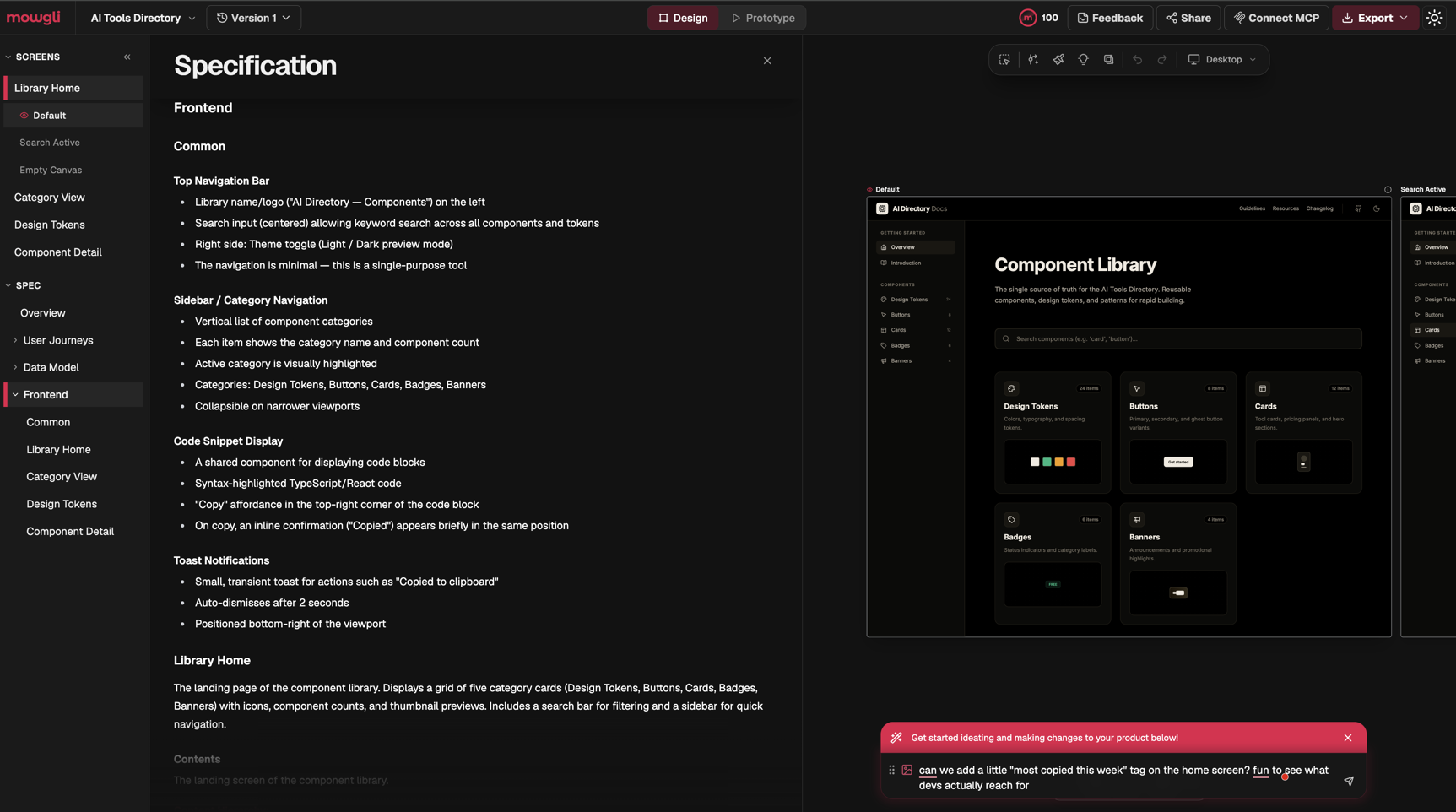
The Frontend section of my project reads like a ticket a senior frontend dev would write:
- Toasts auto-dismiss after 2 seconds and sit bottom-right.
- The code block has a Copy control top-right, and on click an inline "Copied" confirmation appears in the same spot.
- The category sidebar shows a component count per item and collapses on narrower viewports.
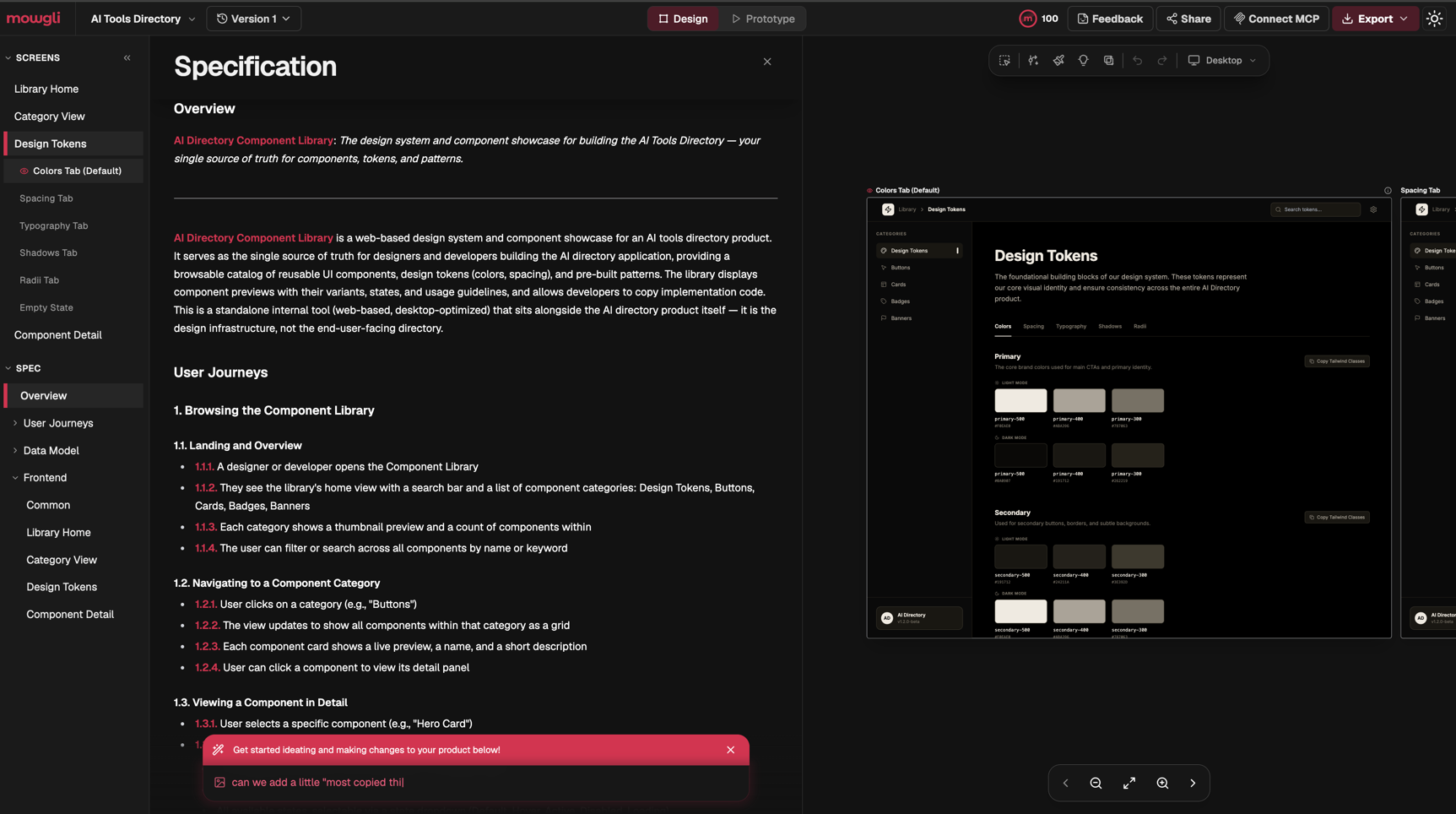
Those are decisions. You can build against them or argue with them, and either way nobody has to guess. The spec also carries an Overview, a Data Model section and User Journeys numbered down to three levels (1.1.1, 1.2.3 and so on), which you can quote in tickets and commit messages.
Every screen comes with its states
Each screen in the left pane expands into named states. Library Home came with Default, Search Active and Empty Canvas. Design Tokens came with a tab per token type (Colors, Spacing, Typography, Shadows, Radii) plus an Empty State.
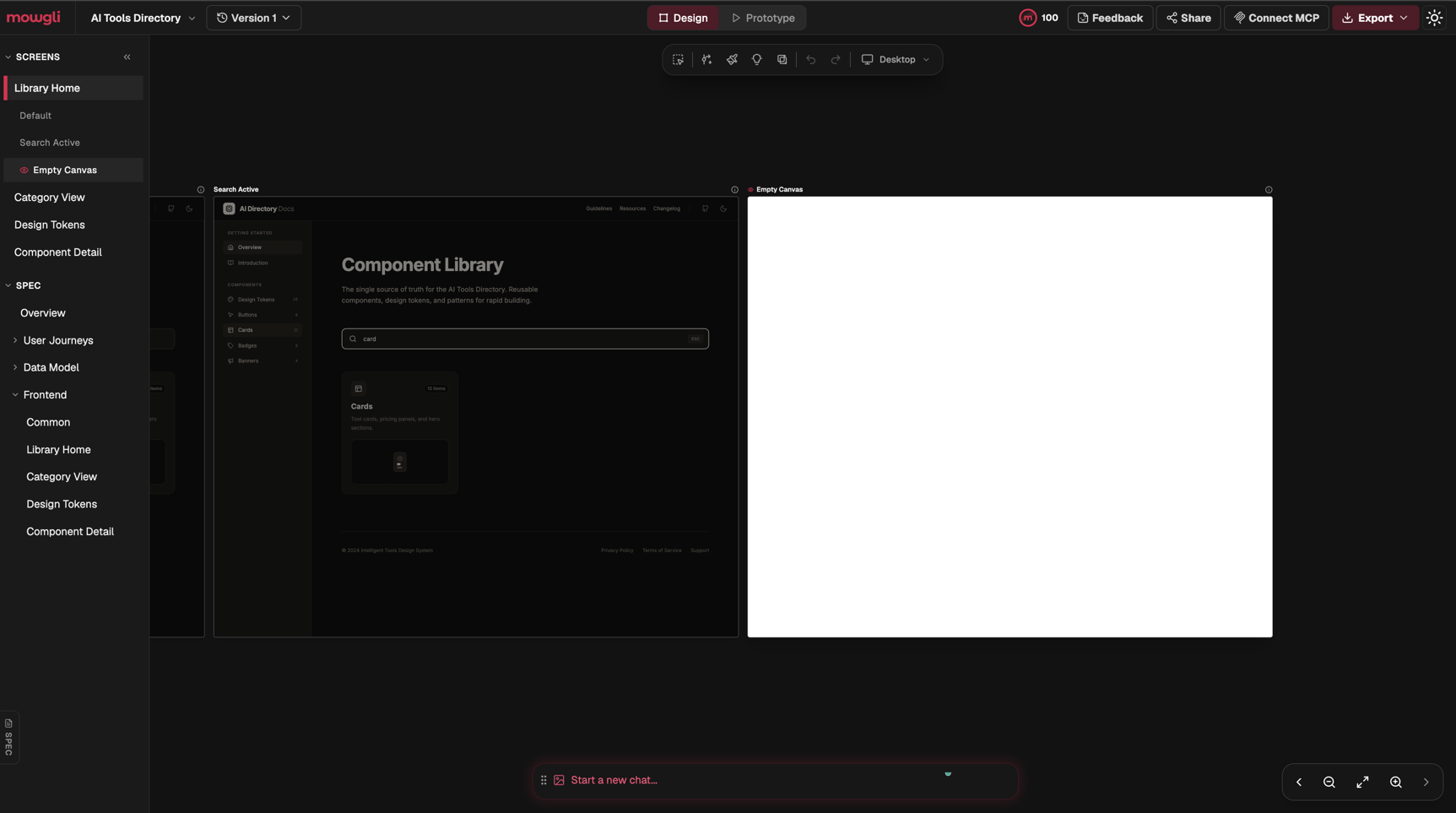
Search Active matches the spec. The query "card" filters the five category tiles down to one, which is journey 1.1.4 ("filter or search across all components by name or keyword") drawn out. A screenshot-driven agent never sees that state unless you draw it yourself.
The Design Tokens screen is the most developer-facing thing Mowgli made. Each colour group has a "Copy Tailwind Classes" button, and swatches carry token names like primary-500 with hex values. Mowgli's pricing FAQ says code export on paid plans is React plus Tailwind, so the tokens and the export speak the same language.
Three things in the output I would fix before building
The Empty Canvas state is a blank white frame. The rest of the app is dark. The one state where a designer earns their fee, the screen with nothing in it, came out as an empty white rectangle. If you hand that to an agent, it will invent the empty state, which is the problem Mowgli exists to solve.
The secondary swatches look inverted. For primary colours, the light-mode row shows light swatches and the dark-mode row shows dark ones. For secondary, the light-mode row is dark and the dark-mode row is light. That may be intentional for borders, but the spec does not say so, and I would ask before shipping those tokens.
The footer says © 2024. The design is from September 2026. It is small, and it is the kind of placeholder an agent copies verbatim into production.
I spotted all three in a few minutes, and a chat message should fix each one. Read the output before you hand it on.
The free plan lets you look; building needs a paid plan
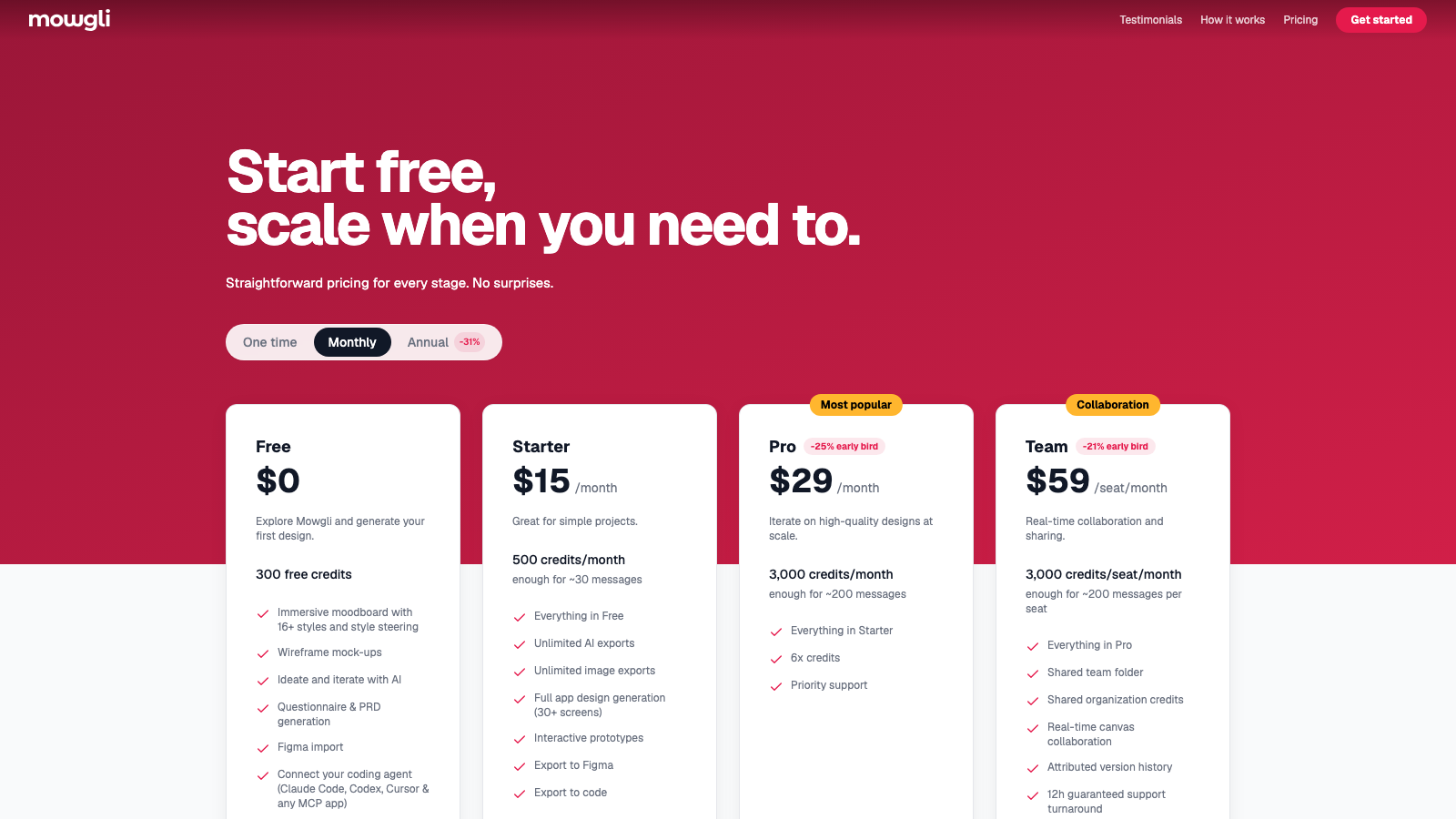
I read mowgli.ai/pricing on 30 September 2026. The page opens on the Annual toggle with a "-31%" badge, so the first prices you see are the annual ones.
| Plan | Monthly | Annual (per month) | Credits | Mowgli's estimate |
|---|---|---|---|---|
| Free | $0 | $0 | 300, one time | n/a |
| Starter | $15 | $12 ($144/yr) | 500/month | ~30 messages |
| Pro | $29 | $20 ($240/yr) | 3,000/month | ~200 messages |
| Team | $59/seat | $49/seat ($588/yr) | 3,000/seat/month | ~200 per seat |
Pro and Team carry "early bird" badges (-25% and -21% on monthly), so expect those two prices to rise. A One time tab sells credit packs that expire after 3 months: $12 for 250, $20 for 750, $40 for 2,000 and $100 for 8,000.
The Free plan includes the moodboard, wireframes, the questionnaire and PRD, Figma import, version history and read access for your coding agent over MCP. Mowgli's own FAQ lists full app design generation (30+ screens), interactive prototypes, chat editing and every export as paid features.
What a design costs in credits
The pricing FAQ publishes a cost for each action. I converted the main ones to dollars at the monthly rates, because that is the figure you pay if you subscribe for a single project.
| Action | Credits | Starter ($0.030/credit) | Pro ($0.0097/credit) | $12 pack ($0.048/credit) |
|---|---|---|---|---|
| Start project | 50 | $1.50 | $0.48 | $2.40 |
| Create full design | 130 | $3.90 | $1.26 | $6.24 |
| Redesign | 100 | $3.00 | $0.97 | $4.80 |
| Chat message | 15 | $0.45 | $0.15 | $0.72 |
| Create prototype | 250 | $7.50 | $2.42 | $12.00 |
| Import Figma | 200 | $6.00 | $1.93 | $9.60 |
| Figma export | 10 per screen | $0.30 | $0.10 | $0.48 |
Two gotchas come out of that table:
- 300 free credits cover one attempt. A project start, a questionnaire and one full design come to 210 credits and leave 90. My credit counter showed 100 at the end of my session.
- A Figma import eats the free plan. Start plus import is 250 credits, leaving 50, which is not enough for one redesign (100).
On a subscription, Mowgli and image exports cost nothing and agent edits drop from 30 credits to 10. Reading designs and pulling changes over MCP cost no credits on any plan, per the FAQ. I have not run that flow, so I am quoting the pricing page there.
Mowgli vs Figma, and the other tools in the directory
Mowgli exports to Figma at 10 credits a screen, so the realistic setup uses both: Mowgli for the first draft, the states and the spec, and Figma for pixel work and a design team's review. If you already have a designer working in Figma, Figma AI is included in the plan you pay for, and Mowgli adds the spec and the agent handoff.
| Tool | Free tier | Entry paid plan | Record checked |
|---|---|---|---|
| Mowgli | 300 credits, one time | Starter $15/mo, $12 billed annually | 30 Sep |
| Figma AI | Starter plan | Professional $20/seat/mo, $16 billed annually | 18 Sep |
| UX Magic | 20 credits a day, 3 screens | Pro $35/mo, $17.50 billed annually | 21 Sep |
| v0 | $5 of credits, 7 messages a day | Plus $30/user/mo (shown struck through from $90) | 30 Sep |
| Lovable | Yes | Pro $25/mo, $21 billed annually | 19 Sep |
All dates 2026. I have not run the same project through the other four, so this table compares price and access, not output. v0 and Lovable generate running code first and design second, which puts them one step later in the process than Mowgli.
Side-by-side pages cover more fields: Figma AI vs Mowgli, Mowgli vs v0, Mowgli vs UX Magic and Lovable vs Mowgli.
Who should use Mowgli, and who should skip it
Use it if you are a developer or a solo founder about to point a coding agent at a new app and you have no designer. The spec, the per-screen states and the token names give the agent more to work with than a prompt. If you already run an MCP setup like the one in my Claude Code MCP guide, the MCP connection is the obvious next thing to test.
Use it as a designer if you want a fast first draft with the edge cases listed, then export to Figma and take it from there.
Skip it if you have a design system and a designer already. You would pay credits to regenerate decisions your team has made. Skip it too if you want production code in one step; v0 or Lovable get you to a running app faster, with the generic-defaults problem this tool tries to solve.
Verdict
The spec Mowgli wrote in one session held more concrete decisions than many handoffs I have built from: timings, positions, states and numbered journeys you can reference. The output needs a read before it goes anywhere, as the blank empty state, the inverted secondary swatches and the stale footer show. The free plan is a demo, and at $0.45 a chat message on Starter you will want Pro if you iterate a lot. My own note after the session was that it looks good and is a decent way to build up the UI for a project, and the spec is why. I have not tested the MCP handoff or the exports yet, and those decide whether it earns a place in the build.
Try it from the Mowgli listing, and check Figma AI vs Mowgli if you are choosing between the two.
Mowgli is a featured tool on Intelligent Tools. This review is based on hands-on testing and reflects our honest assessment.
Tested on mowgli.ai on 30 September 2026, one project on one account. Pricing read from mowgli.ai/pricing the same day.